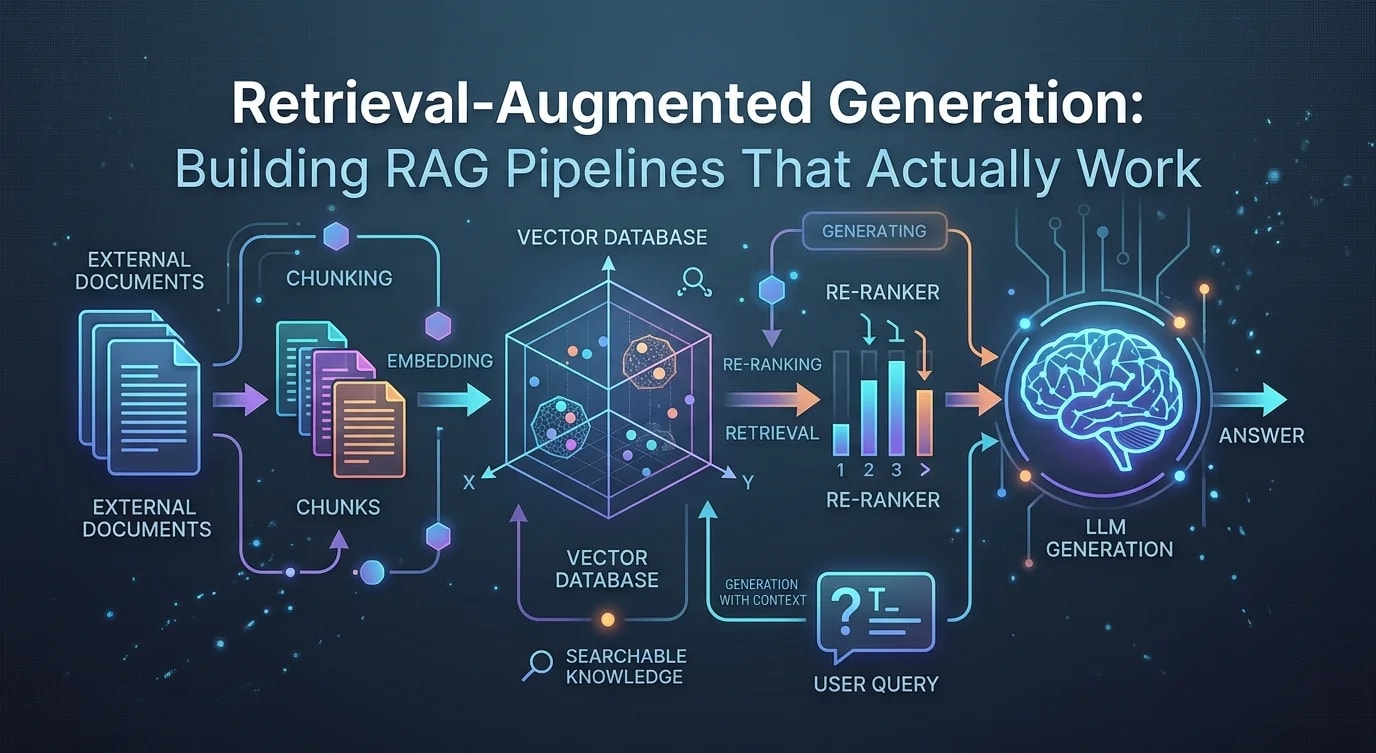
Building RAG Pipelines That Actually Work
A hands-on guide to reliable RAG systems: chunking strategies, embedding models, vector stores and the retrieval patterns that separate demos from production.

The Gap Between RAG Demos and RAG in Production
Every RAG tutorial follows the same script: load documents, split them, embed them, store them in a vector database, retrieve on query, feed into an LLM. The demo works. You ask a question, the model cites your documents, and it looks magical.
Then you deploy it with real data. The model hallucinates answers that sound plausible but aren't in your documents. It retrieves irrelevant chunks. It misses obvious answers because the relevant text was split across two chunks. The magical demo falls apart.
The difference between a working RAG prototype and a production RAG system lives in the details: how you chunk, what you embed, how you retrieve, and how you verify the output. This guide covers each layer.
Chunking: The Foundation Everyone Gets Wrong
Chunking is the most underappreciated step in the RAG pipeline. Most tutorials use fixed-size character splitting and move on. But chunk quality directly determines retrieval quality, which determines answer quality.
# ❌ Bad: Fixed-size splitting ignores document structure
from langchain.text_splitter import CharacterTextSplitter

splitter = CharacterTextSplitter(
    chunk_size=1000,
    chunk_overlap=0,  # No overlap means lost context at boundaries
    separator="\n"
)
chunks = splitter.split_text(document)# ✅ Good: Recursive splitting with overlap and metadata preservation
from langchain.text_splitter import RecursiveCharacterTextSplitter
splitter = RecursiveCharacterTextSplitter(
chunk_size=512,
chunk_overlap=64,
separators=["\n\n", "\n", ". ", " ", ""],
length_function=len,
)
def chunk_with_metadata(
text: str,
source: str,
doc_type: str
) -> list[dict]:
chunks = splitter.split_text(text)
return [
{
"text": chunk,
"metadata": {
"source": source,
"doc_type": doc_type,
"chunk_index": i,
"total_chunks": len(chunks),
},
}
for i, chunk in enumerate(chunks)
]The recursive splitter tries to split on paragraph boundaries first, then sentences, then words. This preserves semantic coherence within chunks. The 64-character overlap ensures that sentences straddling chunk boundaries appear in both chunks.
Chunk size matters more than most people realize. Smaller chunks (256-512 tokens) produce more precise retrieval but lose context. Larger chunks (1024-2048 tokens) maintain context but dilute relevance scores. The sweet spot depends on your query patterns.
Embedding Strategy: Beyond Default Models
The embedding model is your retrieval engine. It converts text into dense vectors that capture semantic meaning. The quality of these vectors determines whether relevant chunks land near your query in vector space.
from openai import OpenAI
import numpy as np

client = OpenAI()

def embed_texts(texts: list[str], model: str = "text-embedding-3-small") -> list[list[float]]:
    response = client.embeddings.create(
        input=texts,
        model=model,
    )
    return [item.embedding for item in response.data]


def cosine_similarity(a: list[float], b: list[float]) -> float:
    a_arr = np.array(a)
    b_arr = np.array(b)
    return float(np.dot(a_arr, b_arr) / (np.linalg.norm(a_arr) * np.linalg.norm(b_arr)))


# Batch embedding for efficiency
def embed_document_chunks(
    chunks: list[dict],
    batch_size: int = 100
) -> list[dict]:
    all_texts = [c["text"] for c in chunks]
    all_embeddings = []

    for i in range(0, len(all_texts), batch_size):
        batch = all_texts[i : i + batch_size]
        embeddings = embed_texts(batch)
        all_embeddings.extend(embeddings)

    for chunk, embedding in zip(chunks, all_embeddings):
        chunk["embedding"] = embedding

    return chunks
Batch your embedding requests. Embedding one chunk at a time adds massive latency and costs more due to per-request overhead. Process in batches of 100-500 depending on your provider's rate limits.
Vector Store Integration and Indexing
Once you have embeddings, you need a vector store that supports efficient approximate nearest neighbor search. The choice between Pinecone, Weaviate, Qdrant, Chroma, and pgvector depends on your scale and operational requirements.
from qdrant_client import QdrantClient
from qdrant_client.models import (
    Distance,
    PointStruct,
    VectorParams,
    Filter,
    FieldCondition,
    MatchValue,
)
import uuid

client = QdrantClient(url="http://localhost:6333")

COLLECTION_NAME = "documents"
VECTOR_SIZE = 1536  # text-embedding-3-small dimension


def initialize_collection() -> None:
    client.recreate_collection(
        collection_name=COLLECTION_NAME,
        vectors_config=VectorParams(
            size=VECTOR_SIZE,
            distance=Distance.COSINE,
        ),
    )


def upsert_chunks(chunks: list[dict]) -> None:
    points = [
        PointStruct(
            id=str(uuid.uuid4()),
            vector=chunk["embedding"],
            payload={
                "text": chunk["text"],
                **chunk["metadata"],
            },
        )
        for chunk in chunks
    ]

    client.upsert(
        collection_name=COLLECTION_NAME,
        points=points,
    )


def search_similar(
    query_embedding: list[float],
    doc_type: str | None = None,
    top_k: int = 5,
) -> list[dict]:
    search_filter = None
    if doc_type:
        search_filter = Filter(
            must=[
                FieldCondition(
                    key="doc_type",
                    match=MatchValue(value=doc_type),
                )
            ]
        )

    results = client.search(
        collection_name=COLLECTION_NAME,
        query_vector=query_embedding,
        query_filter=search_filter,
        limit=top_k,
    )

    return [
        {
            "text": hit.payload["text"],
            "score": hit.score,
            "source": hit.payload.get("source", ""),
        }
        for hit in results
    ]
Metadata filtering is crucial. If your documents span multiple categories, departments, or time periods, filtering on metadata before vector search dramatically improves precision. A query about Q3 financials should not retrieve Q1 marketing docs, even if they are semantically similar.
Retrieval Patterns: Hybrid Search and Reranking
Pure vector search misses exact keyword matches. Pure keyword search misses semantic connections. Hybrid search combines both for better recall.
from qdrant_client.models import SearchParams

def hybrid_search(
    query: str,
    query_embedding: list[float],
    top_k: int = 10,
    rerank_top_k: int = 5,
) -> list[dict]:
    # Step 1: Vector search for semantic matches
    vector_results = search_similar(query_embedding, top_k=top_k)

    # Step 2: Keyword search for exact matches
    keyword_results = client.scroll(
        collection_name=COLLECTION_NAME,
        scroll_filter=Filter(
            must=[
                FieldCondition(
                    key="text",
                    match=MatchValue(value=query),
                )
            ]
        ),
        limit=top_k,
    )[0]

    # Step 3: Merge and deduplicate
    seen_texts = set()
    combined = []
    for result in vector_results:
        if result["text"] not in seen_texts:
            seen_texts.add(result["text"])
            combined.append(result)

    for point in keyword_results:
        text = point.payload["text"]
        if text not in seen_texts:
            seen_texts.add(text)
            combined.append({
                "text": text,
                "score": 0.5,
                "source": point.payload.get("source", ""),
            })

    # Step 4: Rerank with cross-encoder
    return rerank_results(query, combined[:rerank_top_k])
Reranking with a cross-encoder is the highest-impact improvement you can make to a RAG pipeline. Vector search uses bi-encoders—fast but approximate. Cross-encoders process the query and document together, producing far more accurate relevance scores at the cost of speed.
from sentence_transformers import CrossEncoder

reranker = CrossEncoder("cross-encoder/ms-marco-MiniLM-L-6-v2")


def rerank_results(
    query: str,
    results: list[dict],
) -> list[dict]:
    if not results:
        return []

    pairs = [(query, r["text"]) for r in results]
    scores = reranker.predict(pairs)

    for result, score in zip(results, scores):
        result["rerank_score"] = float(score)

    return sorted(results, key=lambda x: x["rerank_score"], reverse=True)
Prompt Construction: Context Window Management
The retrieved chunks need to be assembled into a prompt that gives the LLM enough context to answer accurately without exceeding the context window or diluting focus.
from openai import OpenAI

client = OpenAI()


def build_rag_prompt(
    query: str,
    retrieved_chunks: list[dict],
    max_context_tokens: int = 3000,
) -> list[dict]:
    context_parts = []
    estimated_tokens = 0

    for chunk in retrieved_chunks:
        chunk_tokens = len(chunk["text"].split()) * 1.3
        if estimated_tokens + chunk_tokens > max_context_tokens:
            break
        context_parts.append(
            f"[Source: {chunk['source']}]\n{chunk['text']}"
        )
        estimated_tokens += chunk_tokens

    context = "\n\n---\n\n".join(context_parts)

    return [
        {
            "role": "system",
            "content": (
                "You are a helpful assistant that answers questions based on "
                "the provided context. If the context does not contain enough "
                "information to answer the question, say so explicitly. "
                "Do not make up information. Cite sources when possible."
            ),
        },
        {
            "role": "user",
            "content": f"Context:\n{context}\n\nQuestion: {query}",
        },
    ]


def query_rag(query: str) -> str:
    query_embedding = embed_texts([query])[0]
    chunks = hybrid_search(query, query_embedding, top_k=10, rerank_top_k=5)
    messages = build_rag_prompt(query, chunks)

    response = client.chat.completions.create(
        model="gpt-4o",
        messages=messages,
        temperature=0.1,
    )

    return response.choices[0].message.content or ""
Low temperature (0.1-0.2) reduces hallucination in RAG responses. The system prompt explicitly instructs the model to acknowledge knowledge gaps rather than fabricate answers—this is non-negotiable for production systems.
Evaluation: Measuring RAG Quality
You cannot improve what you cannot measure. RAG evaluation requires testing three dimensions: retrieval quality (are you finding the right chunks?), generation quality (is the answer correct?), and faithfulness (does the answer stay grounded in the retrieved context?).
def evaluate_retrieval(
    test_cases: list[dict],
) -> dict:
    metrics = {"recall_at_5": [], "mrr": []}

    for case in test_cases:
        query_embedding = embed_texts([case["query"]])[0]
        results = search_similar(query_embedding, top_k=5)
        retrieved_sources = [r["source"] for r in results]

        relevant = case["relevant_sources"]
        hits = [s for s in retrieved_sources if s in relevant]

        recall = len(hits) / len(relevant) if relevant else 0
        metrics["recall_at_5"].append(recall)

        for rank, source in enumerate(retrieved_sources, 1):
            if source in relevant:
                metrics["mrr"].append(1.0 / rank)
                break
        else:
            metrics["mrr"].append(0.0)

    return {
        "mean_recall_at_5": sum(metrics["recall_at_5"]) / len(metrics["recall_at_5"]),
        "mean_mrr": sum(metrics["mrr"]) / len(metrics["mrr"]),
    }
Build a test set of 50-100 question-answer pairs with known source documents. Run retrieval evaluation after every change to your chunking strategy, embedding model, or search parameters. A 5% improvement in recall@5 can translate to a dramatically better user experience.
Key Takeaways
RAG is not a single technique—it is a pipeline, and every stage compounds quality or errors. Chunk with semantic boundaries and overlap. Batch your embeddings. Filter on metadata before vector search. Rerank with cross-encoders. Keep temperatures low and system prompts strict.
The gap between a RAG demo and a RAG product is measurement. Without retrieval evaluation and faithfulness checks, you are flying blind. Build your test set early, automate your evaluation pipeline, and let the metrics guide every architectural decision.