Production RAG: From Retrieval to Accurate Answers
Build production RAG pipelines that retrieve real context and answer accurately: chunking, embedding models, vector search, re-ranking and evaluation.
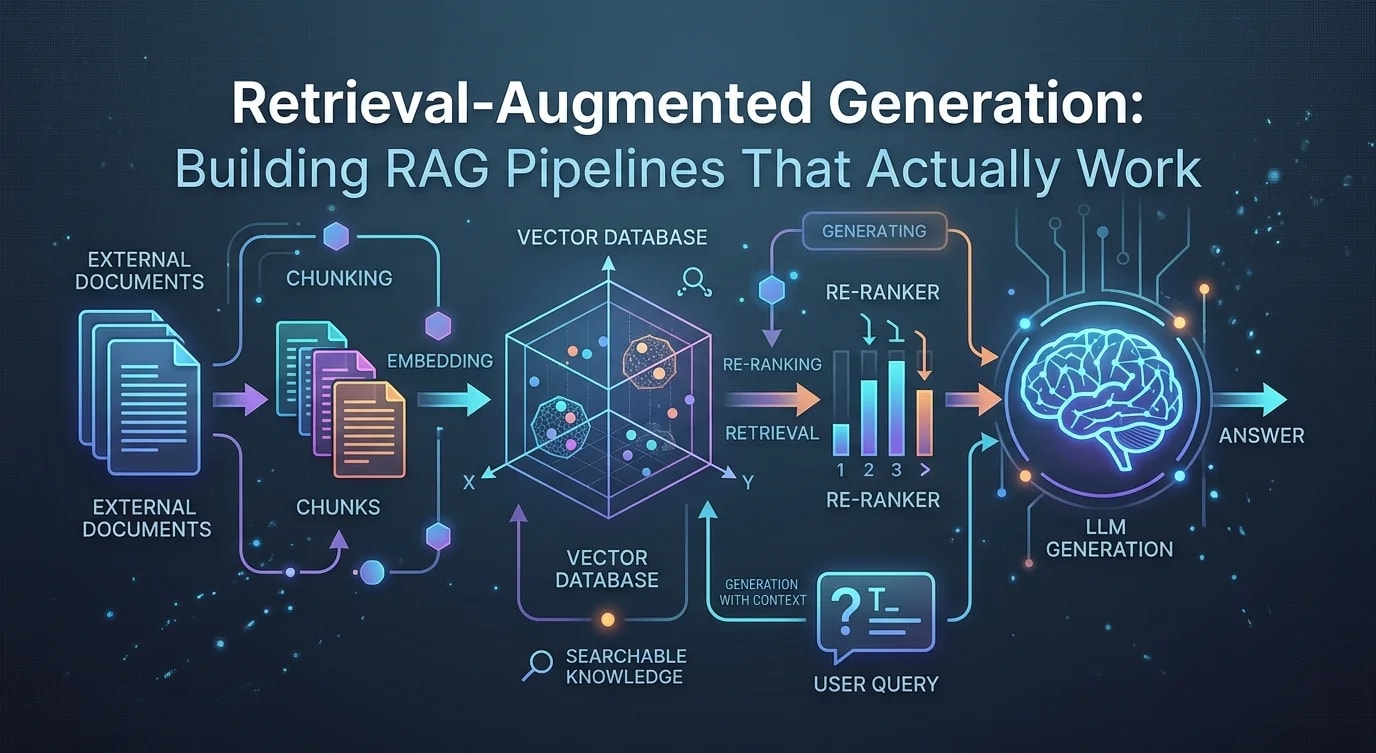
The Problem RAG Solves
LLMs have impressive general knowledge but cannot access your private documents, recent data, or domain-specific information. Fine-tuning is expensive and slow to update. RAG retrieves relevant documents at query time and injects them into the prompt, giving the LLM current, accurate context without retraining.
Document Chunking Strategy
How you split documents determines retrieval quality. Chunks that are too small lose context. Chunks that are too large dilute the relevant information and waste token budget.
interface Chunk {
  id: string;
  text: string;
  metadata: {
    source: string;
    page?: number;
    section?: string;
    chunkIndex: number;
  };
}

// ❌ Fixed-size splitting — breaks mid-sentence, loses context
function badChunking(text: string, size: number): string[] {
  const chunks: string[] = [];
  for (let i = 0; i < text.length; i += size) {
    chunks.push(text.slice(i, i + size));
  }
  return chunks;
}

// ✅ Recursive character splitting with overlap
function chunkDocument(
  text: string,
  config: {
    chunkSize: number;
    chunkOverlap: number;
    separators: string[];
  }
): string[] {
  const { chunkSize, chunkOverlap, separators } = config;
  const chunks: string[] = [];

  function splitRecursive(text: string, separatorIndex: number): string[] {
    if (text.length <= chunkSize) return [text];

    const separator = separators[separatorIndex] ?? "";
    const splits = text.split(separator).filter(Boolean);

    const result: string[] = [];
    let current = "";

    for (const split of splits) {
      const candidate = current
        ? current + separator + split
        : split;

      if (candidate.length > chunkSize && current) {
        result.push(current.trim());
        // Overlap: keep the tail of the previous chunk
        const overlapText = current.slice(-chunkOverlap);
        current = overlapText + separator + split;
      } else {
        current = candidate;
      }
    }
    if (current.trim()) result.push(current.trim());

    // If chunks are still too large, split with next separator
    if (separatorIndex < separators.length - 1) {
      return result.flatMap((chunk) =>
        chunk.length > chunkSize
          ? splitRecursive(chunk, separatorIndex + 1)
          : [chunk]
      );
    }

    return result;
  }

  return splitRecursive(text, 0);
}

const defaultConfig = {
  chunkSize: 512,
  chunkOverlap: 50,
  separators: ["\n\n", "\n", ". ", " "],
};
Embedding and Indexing
Convert chunks into vector embeddings and store them in a vector database for similarity search.
interface EmbeddingResult {
  chunkId: string;
  vector: number[];
  metadata: Record<string, unknown>;
}

async function embedChunks(
  chunks: Chunk[],
  model: string = "text-embedding-3-small"
): Promise<EmbeddingResult[]> {
  const batchSize = 100;
  const results: EmbeddingResult[] = [];

  for (let i = 0; i < chunks.length; i += batchSize) {
    const batch = chunks.slice(i, i + batchSize);

    const response = await fetch("https://api.openai.com/v1/embeddings", {
      method: "POST",
      headers: {
        "Content-Type": "application/json",
        Authorization: `Bearer ${process.env.OPENAI_API_KEY}`,
      },
      body: JSON.stringify({
        model,
        input: batch.map((c) => c.text),
      }),
    });

    const data = await response.json();

    for (let j = 0; j < batch.length; j++) {
      results.push({
        chunkId: batch[j].id,
        vector: data.data[j].embedding,
        metadata: {
          text: batch[j].text,
          ...batch[j].metadata,
        },
      });
    }
  }

  return results;
}

// Store in vector database (Pinecone example)
async function indexEmbeddings(
  embeddings: EmbeddingResult[],
  namespace: string
): Promise<void> {
  const vectors = embeddings.map((e) => ({
    id: e.chunkId,
    values: e.vector,
    metadata: e.metadata,
  }));

  await pineconeIndex.namespace(namespace).upsert(vectors);
}
Retrieval with Re-Ranking
Vector similarity search retrieves candidates. A re-ranker scores them for actual relevance to the query, filtering out semantically similar but irrelevant results.
interface RetrievedChunk {
  text: string;
  score: number;
  metadata: Record<string, unknown>;
}

async function retrieveWithReranking(
  query: string,
  config: { topK: number; rerankTopN: number }
): Promise<RetrievedChunk[]> {
  // Step 1: Embed the query
  const queryEmbedding = await embedQuery(query);

  // Step 2: Vector search — retrieve more candidates than needed
  const candidates = await pineconeIndex.query({
    vector: queryEmbedding,
    topK: config.topK * 3, // Over-fetch for re-ranking
    includeMetadata: true,
  });

  // Step 3: Re-rank candidates for relevance
  const reranked = await rerank(
    query,
    candidates.matches.map((m) => ({
      text: m.metadata?.text as string,
      score: m.score ?? 0,
      metadata: m.metadata ?? {},
    }))
  );

  return reranked.slice(0, config.rerankTopN);
}

async function rerank(
  query: string,
  docs: RetrievedChunk[]
): Promise<RetrievedChunk[]> {
  const response = await fetch("https://api.cohere.ai/v1/rerank", {
    method: "POST",
    headers: {
      Authorization: `Bearer ${process.env.COHERE_API_KEY}`,
      "Content-Type": "application/json",
    },
    body: JSON.stringify({
      model: "rerank-english-v3.0",
      query,
      documents: docs.map((d) => d.text),
      top_n: docs.length,
    }),
  });

  const data = await response.json();
  return data.results.map((r: { index: number; relevance_score: number }) => ({
    ...docs[r.index],
    score: r.relevance_score,
  }));
}
Generation with Retrieved Context
Inject retrieved chunks into the LLM prompt with clear instructions to use them as the primary source and to acknowledge when the context does not contain the answer.
function buildRAGPrompt(
  query: string,
  context: RetrievedChunk[]
): string {
  const contextBlock = context
    .map((c, i) => `[Source ${i + 1}] (${c.metadata.source})\n${c.text}`)
    .join("\n\n---\n\n");

  return `You are a helpful assistant. Answer the user's question using ONLY the provided context. If the context does not contain enough information to answer fully, say so explicitly. Do not make up information.

## Context
${contextBlock}

## Question
${query}

## Instructions
- Cite sources using [Source N] notation
- If the context doesn't contain the answer, say "I don't have enough information to answer this question based on the available documents"
- Be concise and direct`;
}

async function generateAnswer(
  query: string,
  context: RetrievedChunk[]
): Promise<{ answer: string; sources: string[] }> {
  const prompt = buildRAGPrompt(query, context);

  const response = await fetch("https://api.openai.com/v1/chat/completions", {
    method: "POST",
    headers: {
      "Content-Type": "application/json",
      Authorization: `Bearer ${process.env.OPENAI_API_KEY}`,
    },
    body: JSON.stringify({
      model: "gpt-4o",
      messages: [{ role: "user", content: prompt }],
      temperature: 0.1,
    }),
  });

  const data = await response.json();
  return {
    answer: data.choices[0].message.content,
    sources: context.map((c) => c.metadata.source as string),
  };
}
Evaluating RAG Quality
Without evaluation, you cannot tell if your RAG pipeline is improving or degrading. Measure retrieval recall, answer faithfulness, and relevance.
interface RAGEvaluation {
  query: string;
  expectedAnswer: string;
  retrievedChunks: RetrievedChunk[];
  generatedAnswer: string;
  metrics: {
    retrievalRecall: number;    // Did retrieval find relevant docs?
    answerFaithfulness: number; // Does the answer stick to retrieved context?
    answerRelevance: number;    // Does the answer address the query?
  };
}

async function evaluateRAG(
  testCases: Array<{
    query: string;
    expectedAnswer: string;
    relevantDocIds: string[];
  }>
): Promise<RAGEvaluation[]> {
  const results: RAGEvaluation[] = [];

  for (const testCase of testCases) {
    const chunks = await retrieveWithReranking(testCase.query, {
      topK: 10,
      rerankTopN: 5,
    });

    const { answer } = await generateAnswer(testCase.query, chunks);

    const retrievedIds = chunks.map((c) => c.metadata.chunkId as string);
    const retrievalRecall =
      testCase.relevantDocIds.filter((id) => retrievedIds.includes(id)).length /
      testCase.relevantDocIds.length;

    results.push({
      query: testCase.query,
      expectedAnswer: testCase.expectedAnswer,
      retrievedChunks: chunks,
      generatedAnswer: answer,
      metrics: {
        retrievalRecall,
        answerFaithfulness: await scoreFaithfulness(answer, chunks),
        answerRelevance: await scoreRelevance(answer, testCase.query),
      },
    });
  }

  return results;
}
Key Takeaways
RAG quality depends on every stage of the pipeline: chunking, embedding, retrieval, re-ranking, and generation. Chunk documents semantically with overlap to preserve context across boundaries. Over-fetch candidates during vector search and re-rank for precision—embedding similarity alone misses nuance.
Instruct the LLM to cite sources and acknowledge information gaps. Evaluate your pipeline with test cases that measure retrieval recall, answer faithfulness, and relevance. Start with a simple pipeline—chunk, embed, retrieve, generate—then add re-ranking and evaluation. The pipeline that retrieves the right context wins; the generation step is only as good as what you feed it.