Retrieval-Augmented Generation: RAG Pipelines That Work
Build effective RAG pipelines in TypeScript: document chunking, embeddings, vector search tuning, prompt construction and retrieval-quality evaluation.

Large language models hallucinate. They generate confident, fluent text that sounds correct but invents facts, misquotes sources, and confuses related concepts. Retrieval-Augmented Generation (RAG) addresses this by grounding the model's responses in actual documents retrieved at query time—the model generates answers based on evidence, not memory.
But RAG systems have their own failure modes. Bad chunking splits relevant context across fragments. Poor embeddings return irrelevant documents. Naive prompt construction overwhelms the context window. Building a RAG pipeline that works requires careful attention to each stage.
The RAG Pipeline Architecture
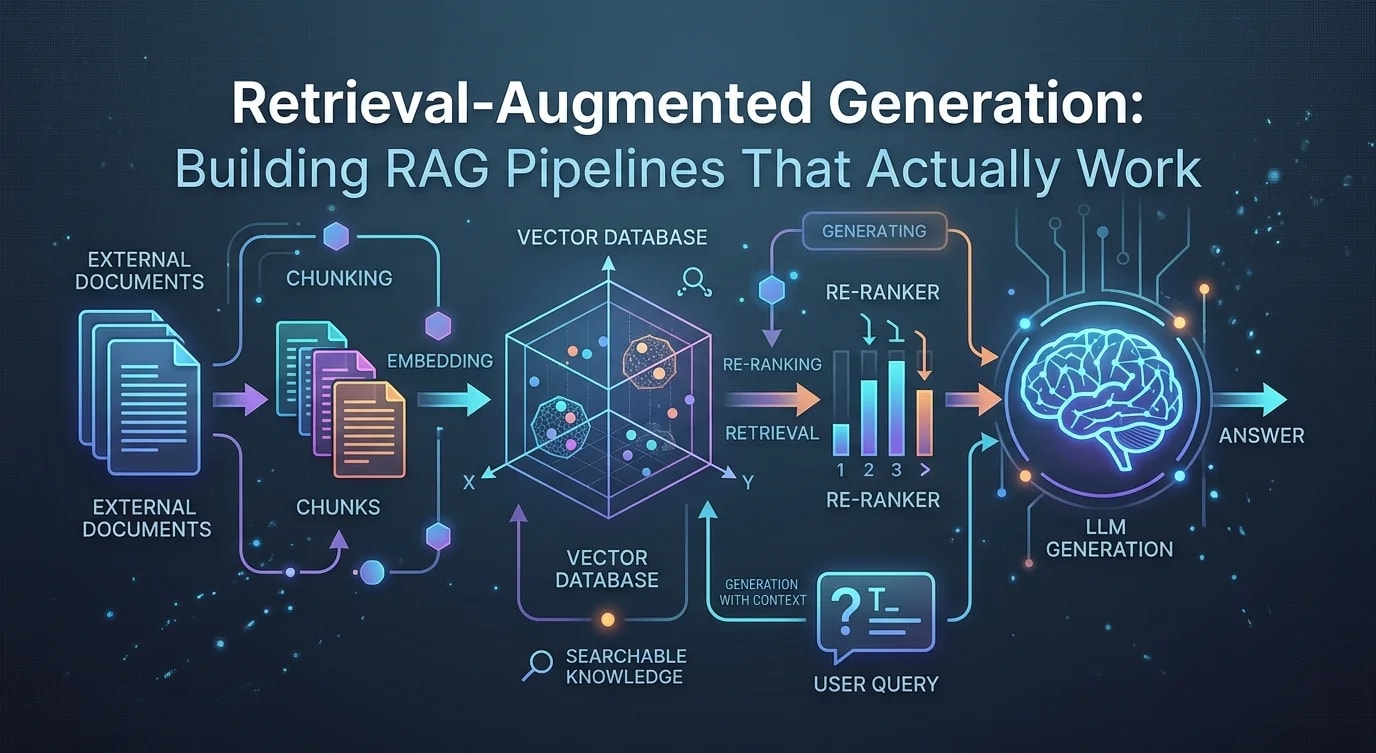
A RAG pipeline has two phases: indexing (offline) and retrieval + generation (real-time).
// ❌ Naive RAG — dumps entire documents into the prompt
async function naiveRAG(query: string) {
  const allDocs = await db.getAllDocuments();
  const prompt = `
    Here are all our documents:
    ${allDocs.map((d) => d.content).join("\n\n")}

    Answer this question: ${query}
  `;
  // Problems:
  // - Exceeds context window
  // - Irrelevant content dilutes the answer
  // - No relevance ranking
  // - Costs a fortune in tokens
  return llm.generate(prompt);
}// ✅ Structured RAG pipeline
async function structuredRAG(query: string) {
// 1. Embed the query
const queryEmbedding = await embedQuery(query);
// 2. Retrieve relevant chunks
const chunks = await vectorStore.search(
queryEmbedding,
{ topK: 5, minScore: 0.7 }
);
// 3. Construct grounded prompt
const prompt = buildPrompt(query, chunks);
// 4. Generate with citations
return llm.generate(prompt, {
temperature: 0.1,
maxTokens: 1000,
});
}Document Chunking Strategies
Chunking determines the granularity of retrieval. Too large, and you waste context window on irrelevant content. Too small, and you lose the context needed to answer questions.
interface Chunk {
  id: string;
  content: string;
  metadata: {
    source: string;
    section: string;
    pageNumber?: number;
    chunkIndex: number;
  };
}

// Strategy 1: Fixed-size with overlap
function fixedSizeChunking(
  text: string,
  chunkSize: number = 500,
  overlap: number = 50
): string[] {
  const words = text.split(/\s+/);
  const chunks: string[] = [];

  for (
    let i = 0;
    i < words.length;
    i += chunkSize - overlap
  ) {
    chunks.push(
      words.slice(i, i + chunkSize).join(" ")
    );
  }

  return chunks;
}

// Strategy 2: Semantic chunking by sections
function semanticChunking(
  markdown: string
): Chunk[] {
  const sections = markdown.split(/^##\s+/m);
  const chunks: Chunk[] = [];

  for (let i = 0; i < sections.length; i++) {
    const section = sections[i].trim();
    if (!section) continue;

    const lines = section.split("\n");
    const heading = lines[0];
    const content = lines.slice(1).join("\n").trim();

    // Split large sections further
    if (content.length > 2000) {
      const paragraphs = content.split(/\n\n+/);
      let currentChunk = "";

      for (const para of paragraphs) {
        if (
          (currentChunk + para).length > 1500 &&
          currentChunk
        ) {
          chunks.push({
            id: `chunk-${chunks.length}`,
            content: `## ${heading}\n\n${currentChunk}`,
            metadata: {
              source: "",
              section: heading,
              chunkIndex: chunks.length,
            },
          });
          currentChunk = para;
        } else {
          currentChunk += (currentChunk ? "\n\n" : "") + para;
        }
      }

      if (currentChunk) {
        chunks.push({
          id: `chunk-${chunks.length}`,
          content: `## ${heading}\n\n${currentChunk}`,
          metadata: {
            source: "",
            section: heading,
            chunkIndex: chunks.length,
          },
        });
      }
    } else {
      chunks.push({
        id: `chunk-${chunks.length}`,
        content: `## ${heading}\n\n${content}`,
        metadata: {
          source: "",
          section: heading,
          chunkIndex: chunks.length,
        },
      });
    }
  }

  return chunks;
}
Embedding and Indexing
Embeddings convert text into dense vectors that capture semantic meaning. Similar texts produce vectors that are close in the embedding space.
import { OpenAI } from "openai";

const openai = new OpenAI();

async function generateEmbeddings(
  texts: string[]
): Promise<number[][]> {
  // Batch embedding for efficiency
  const batchSize = 100;
  const allEmbeddings: number[][] = [];

  for (let i = 0; i < texts.length; i += batchSize) {
    const batch = texts.slice(i, i + batchSize);
    const response = await openai.embeddings.create({
      model: "text-embedding-3-small",
      input: batch,
    });

    allEmbeddings.push(
      ...response.data.map((d) => d.embedding)
    );
  }

  return allEmbeddings;
}

async function indexDocuments(
  chunks: Chunk[]
): Promise<void> {
  const texts = chunks.map((c) => c.content);
  const embeddings = await generateEmbeddings(texts);

  // Store in vector database (using pgvector example)
  for (let i = 0; i < chunks.length; i++) {
    await db.query(
      `INSERT INTO document_chunks
       (id, content, embedding, metadata)
       VALUES ($1, $2, $3, $4)`,
      [
        chunks[i].id,
        chunks[i].content,
        JSON.stringify(embeddings[i]),
        JSON.stringify(chunks[i].metadata),
      ]
    );
  }

  console.log(
    `Indexed ${chunks.length} chunks with embeddings`
  );
}
Retrieval with Hybrid Search
Pure vector search misses exact keyword matches. Pure keyword search misses semantic similarity. Combine both for better results.
interface SearchResult {
  chunk: Chunk;
  score: number;
  matchType: "vector" | "keyword" | "hybrid";
}

async function hybridSearch(
  query: string,
  topK: number = 5
): Promise<SearchResult[]> {
  // Vector search
  const queryEmbedding = await generateEmbeddings([
    query,
  ]);
  const vectorResults = await db.query(
    `SELECT id, content, metadata,
            1 - (embedding <=> $1) as similarity
     FROM document_chunks
     ORDER BY embedding <=> $1
     LIMIT $2`,
    [JSON.stringify(queryEmbedding[0]), topK * 2]
  );

  // Full-text search
  const keywordResults = await db.query(
    `SELECT id, content, metadata,
            ts_rank(search_vector, plainto_tsquery($1)) as rank
     FROM document_chunks
     WHERE search_vector @@ plainto_tsquery($1)
     ORDER BY rank DESC
     LIMIT $2`,
    [query, topK * 2]
  );

  // Reciprocal Rank Fusion to combine results
  const scores = new Map<string, number>();

  vectorResults.rows.forEach(
    (row: { id: string }, idx: number) => {
      const rrf = 1 / (60 + idx + 1);
      scores.set(
        row.id,
        (scores.get(row.id) ?? 0) + rrf
      );
    }
  );

  keywordResults.rows.forEach(
    (row: { id: string }, idx: number) => {
      const rrf = 1 / (60 + idx + 1);
      scores.set(
        row.id,
        (scores.get(row.id) ?? 0) + rrf
      );
    }
  );

  // Sort by combined score and return top K
  const sorted = [...scores.entries()]
    .sort((a, b) => b[1] - a[1])
    .slice(0, topK);

  const allResults = [
    ...vectorResults.rows,
    ...keywordResults.rows,
  ];
  const resultMap = new Map(
    allResults.map((r: { id: string }) => [r.id, r])
  );

  return sorted.map(([id, score]) => ({
    chunk: resultMap.get(id) as unknown as Chunk,
    score,
    matchType: "hybrid" as const,
  }));
}
Prompt Construction with Citations
The prompt must instruct the model to base answers on retrieved context and cite sources. Structure matters.
function buildPrompt(
  query: string,
  results: SearchResult[]
): string {
  const context = results
    .map(
      (r, i) =>
        `[Source ${i + 1}: ${r.chunk.metadata.source}, ` +
        `Section: ${r.chunk.metadata.section}]\n` +
        `${r.chunk.content}`
    )
    .join("\n\n---\n\n");

  return `You are a helpful assistant that answers questions
based on the provided context. Follow these rules:

1. Only use information from the provided context
2. If the context doesn't contain enough information,
   say "I don't have enough information to answer that"
3. Cite sources using [Source N] notation
4. Be specific and concise

Context:
${context}

Question: ${query}

Answer (cite sources):`;
}

// Full pipeline
async function answerQuestion(
  query: string
): Promise<{
  answer: string;
  sources: SearchResult[];
}> {
  const results = await hybridSearch(query, 5);

  if (results.length === 0) {
    return {
      answer:
        "I couldn't find relevant information " +
        "to answer that question.",
      sources: [],
    };
  }

  const prompt = buildPrompt(query, results);

  const response = await openai.chat.completions.create(
    {
      model: "gpt-4o-mini",
      messages: [{ role: "user", content: prompt }],
      temperature: 0.1,
      max_tokens: 1000,
    }
  );

  return {
    answer: response.choices[0].message.content ?? "",
    sources: results,
  };
}
Evaluation: Measuring RAG Quality
A RAG pipeline is only as good as its retrieval. Measure both retrieval quality and generation quality separately.
interface EvalResult {
  query: string;
  retrievalPrecision: number;
  retrievalRecall: number;
  answerRelevance: number;
  faithfulness: number;
}

async function evaluateRAG(
  testCases: {
    query: string;
    expectedChunkIds: string[];
    expectedAnswer: string;
  }[]
): Promise<EvalResult[]> {
  const results: EvalResult[] = [];

  for (const testCase of testCases) {
    const searchResults = await hybridSearch(
      testCase.query,
      5
    );
    const retrievedIds = searchResults.map(
      (r) => r.chunk.id
    );

    // Retrieval precision: how many retrieved docs
    // are relevant?
    const relevantRetrieved = retrievedIds.filter((id) =>
      testCase.expectedChunkIds.includes(id)
    ).length;
    const precision =
      relevantRetrieved / retrievedIds.length;

    // Retrieval recall: how many relevant docs
    // were retrieved?
    const recall =
      relevantRetrieved /
      testCase.expectedChunkIds.length;

    // Generate answer and evaluate
    const { answer } = await answerQuestion(
      testCase.query
    );

    results.push({
      query: testCase.query,
      retrievalPrecision: precision,
      retrievalRecall: recall,
      answerRelevance: 0, // Score with LLM judge
      faithfulness: 0,    // Compare to sources
    });
  }

  return results;
}
Key Takeaways
Chunking strategy determines retrieval quality—semantic chunking that respects document structure (headings, paragraphs, sections) consistently outperforms fixed-size chunking because it preserves the context needed to answer questions within each chunk. Hybrid search combining vector similarity and keyword matching through reciprocal rank fusion retrieves more relevant results than either approach alone, catching both semantic matches that keyword search misses and exact-term matches that embedding similarity misses. Prompt construction must explicitly instruct the model to base answers only on provided context and cite sources, because without these constraints the model will blend retrieved information with its parametric knowledge and produce answers that sound grounded but contain hallucinated details. Evaluate retrieval and generation separately using precision, recall, and faithfulness metrics on a curated test set—a pipeline with bad retrieval quality will never produce good answers regardless of the generation model used.