Kubernetes Probes: Liveness, Readiness and Startup
Configure Kubernetes liveness, readiness and startup probes correctly to prevent cascading failures, avoid restart loops and route traffic only when ready.
Three Probes, Three Purposes
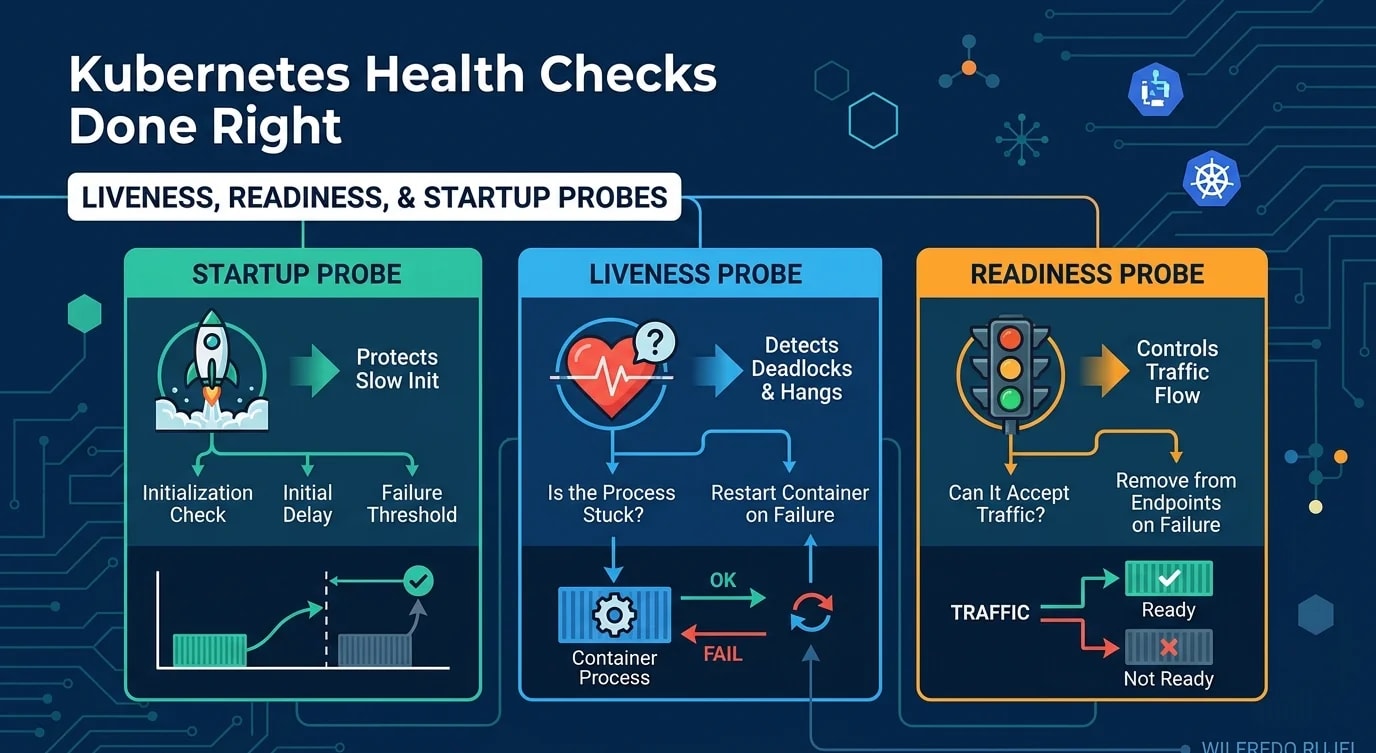
Kubernetes uses three types of health checks to manage pod lifecycle. Confusing them causes cascading restarts, dropped traffic, and mysterious outages. Each probe answers a different question: Is the process alive? Can it accept traffic? Has it finished starting?
Startup Probes: Slow Initialization
Startup probes protect slow-starting containers. Until the startup probe succeeds, Kubernetes disables liveness and readiness checks. Without a startup probe, a container that takes 60 seconds to initialize gets killed by a liveness probe that expects a response in 10 seconds.
# ❌ No startup probe — slow apps get killed during init
apiVersion: apps/v1
kind: Deployment
metadata:
  name: api-server
spec:
  template:
    spec:
      containers:
        - name: api
          image: api-server:latest
          livenessProbe:
            httpGet:
              path: /healthz
              port: 8080
            initialDelaySeconds: 10  # Not enough for heavy init
            periodSeconds: 5
            failureThreshold: 3
# App needs 45 seconds to warm up — gets killed at 25s# ✅ Startup probe gives the app time to initialize
apiVersion: apps/v1
kind: Deployment
metadata:
name: api-server
spec:
template:
spec:
containers:
- name: api
image: api-server:latest
startupProbe:
httpGet:
path: /healthz/started
port: 8080
periodSeconds: 5
failureThreshold: 30 # 5s × 30 = 150s max startup time
livenessProbe:
httpGet:
path: /healthz/live
port: 8080
periodSeconds: 10
failureThreshold: 3
readinessProbe:
httpGet:
path: /healthz/ready
port: 8080
periodSeconds: 5
failureThreshold: 2
successThreshold: 1Liveness Probes: Is the Process Stuck?
Liveness probes detect deadlocks, infinite loops, and corrupted state. When a liveness probe fails, Kubernetes restarts the container. Use liveness probes conservatively—a false positive restarts a healthy container and can cascade into a cluster-wide outage.
// Liveness endpoint: check if the process is fundamentally alive
// Do NOT check dependencies here — that's for readiness
app.get("/healthz/live", (req, res) => {
  // Check for deadlock conditions
  const eventLoopLag = measureEventLoopLag();
  const memoryUsage = process.memoryUsage();

  if (eventLoopLag > 5000) {
    // Event loop blocked for 5+ seconds — likely deadlocked
    res.status(503).json({
      status: "unhealthy",
      reason: "event_loop_blocked",
      lagMs: eventLoopLag,
    });
    return;
  }

  // Process is alive and responding
  res.status(200).json({ status: "ok" });
});

function measureEventLoopLag(): number {
  // Simplified — use a library like 'event-loop-lag' in production
  const start = performance.now();
  // If this takes significantly longer than expected,
  // the event loop is congested
  return performance.now() - start;
}// ❌ Liveness probe that checks database — causes cascading restarts
app.get("/healthz/live", async (req, res) => {
try {
await db.query("SELECT 1"); // DB down → pod restart → more load on DB
res.status(200).send("ok");
} catch {
res.status(503).send("unhealthy");
}
});
// ✅ Liveness only checks if the process itself is healthy
app.get("/healthz/live", (req, res) => {
// No external dependency checks — just process health
res.status(200).json({ status: "alive", uptime: process.uptime() });
});Readiness Probes: Can It Accept Traffic?
Readiness probes control whether a pod receives traffic. When a readiness probe fails, the pod is removed from the Service's endpoints—it stops receiving requests but keeps running. This is where you check dependencies.
interface DependencyCheck {
  name: string;
  check: () => Promise<boolean>;
  critical: boolean;
}

const dependencies: DependencyCheck[] = [
  {
    name: "database",
    critical: true,
    check: async () => {
      try {
        await db.query("SELECT 1");
        return true;
      } catch {
        return false;
      }
    },
  },
  {
    name: "redis",
    critical: true,
    check: async () => {
      try {
        await redis.ping();
        return true;
      } catch {
        return false;
      }
    },
  },
  {
    name: "external-api",
    critical: false, // Degraded but functional without it
    check: async () => {
      try {
        const response = await fetch("https://api.example.com/health", {
          signal: AbortSignal.timeout(2000),
        });
        return response.ok;
      } catch {
        return false;
      }
    },
  },
];

app.get("/healthz/ready", async (req, res) => {
  const results = await Promise.all(
    dependencies.map(async (dep) => ({
      name: dep.name,
      healthy: await dep.check(),
      critical: dep.critical,
    }))
  );

  const criticalFailures = results.filter(
    (r) => r.critical && !r.healthy
  );

  if (criticalFailures.length > 0) {
    res.status(503).json({
      status: "not_ready",
      failures: criticalFailures.map((f) => f.name),
      checks: results,
    });
    return;
  }

  res.status(200).json({
    status: "ready",
    checks: results,
  });
});
Graceful Shutdown with PreStop Hooks
When Kubernetes terminates a pod, it sends SIGTERM and simultaneously removes the pod from endpoints. There is a race condition: traffic may arrive after the pod starts shutting down. A preStop hook adds a delay to drain in-flight requests.
spec:
  containers:
    - name: api
      lifecycle:
        preStop:
          exec:
            command: ["sh", "-c", "sleep 10"]
terminationGracePeriodSeconds: 30// Handle graceful shutdown in Node.js
let isShuttingDown = false;
process.on("SIGTERM", async () => {
console.log("SIGTERM received, starting graceful shutdown");
isShuttingDown = true;
// Stop accepting new connections
server.close(async () => {
// Close database connections
await db.end();
await redis.quit();
console.log("Graceful shutdown complete");
process.exit(0);
});
// Force exit after timeout
setTimeout(() => {
console.error("Forced shutdown after timeout");
process.exit(1);
}, 25_000);
});
// Readiness probe returns not ready during shutdown
app.get("/healthz/ready", (req, res) => {
if (isShuttingDown) {
res.status(503).json({ status: "shutting_down" });
return;
}
// ... normal readiness checks
});Common Mistakes and Fixes
The most dangerous misconfiguration is aggressive liveness probes that restart pods during transient issues, creating a snowball effect.
// Probe configuration guidelines as code
interface ProbeConfig {
  path: string;
  periodSeconds: number;
  failureThreshold: number;
  timeoutSeconds: number;
  successThreshold: number;
}

const recommendedConfig = {
  startup: {
    path: "/healthz/started",
    periodSeconds: 5,
    failureThreshold: 30,      // Allow 150s startup
    timeoutSeconds: 3,
    successThreshold: 1,
  } satisfies ProbeConfig,

  liveness: {
    path: "/healthz/live",
    periodSeconds: 15,          // Not too frequent
    failureThreshold: 3,        // 3 failures = 45s before restart
    timeoutSeconds: 5,
    successThreshold: 1,
  } satisfies ProbeConfig,

  readiness: {
    path: "/healthz/ready",
    periodSeconds: 5,           // Quick to remove from rotation
    failureThreshold: 2,        // 2 failures = 10s before traffic stops
    timeoutSeconds: 3,
    successThreshold: 1,        // 1 success = back in rotation
  } satisfies ProbeConfig,
};
Key Takeaways
The three Kubernetes probes serve distinct purposes and must not be confused. Startup probes protect slow-initializing containers from premature restarts. Liveness probes detect deadlocked processes—check only process health, never external dependencies. Readiness probes gate traffic—check databases, caches, and downstream services here.
Never put dependency checks in liveness probes. A failing database causes all pods to restart, increasing load on the already-failing database—a cascading failure loop. Configure probe thresholds conservatively: liveness should be slow to trigger (high failureThreshold), readiness should be quick to react. Implement graceful shutdown with preStop hooks and SIGTERM handling to drain in-flight requests during deployments. Health checks are simple to implement but catastrophic to misconfigure.