Blue-Green Deployments: Zero-Downtime Releases
Blue-green deployments remove release anxiety by running two identical production environments and switching traffic instantly — here is how to do it.
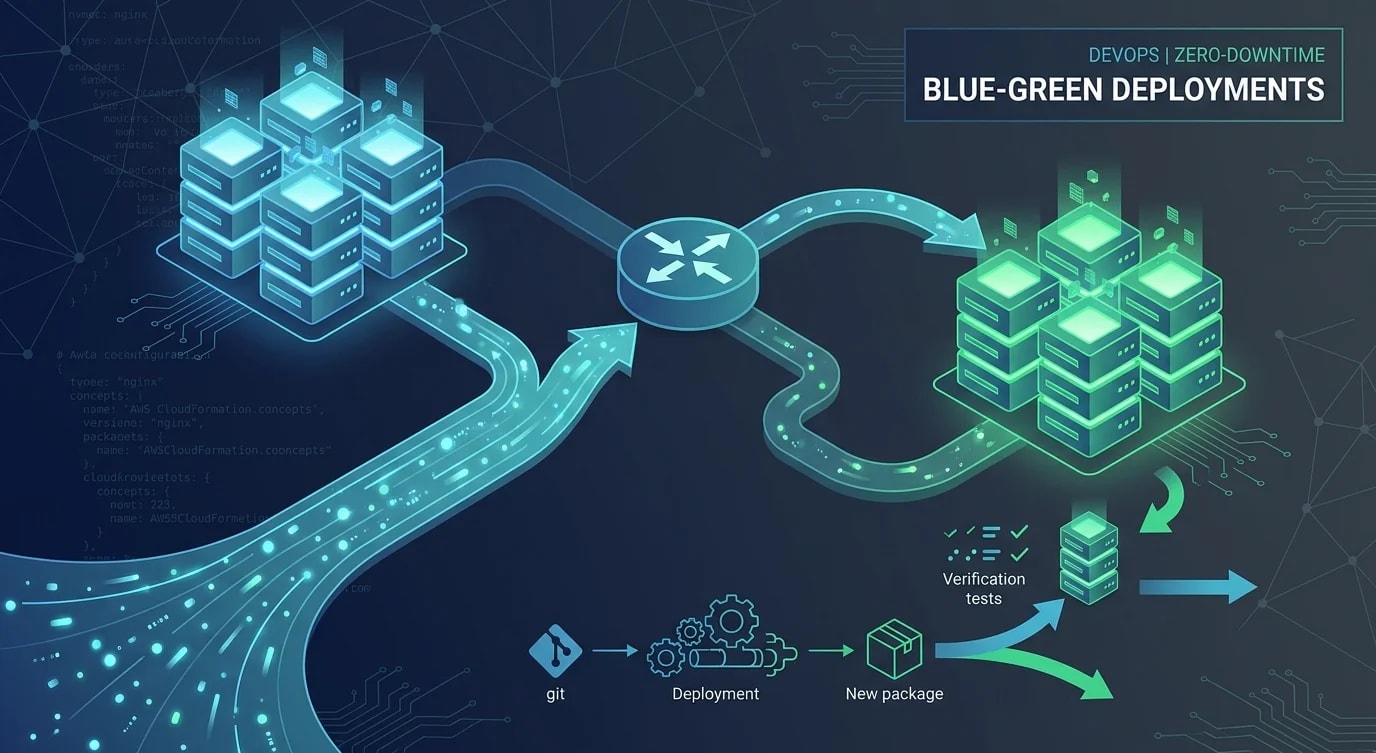
Traditional deployments have a terrifying moment: the old version is down, the new version is coming up, and you're hoping nothing breaks. Blue-green deployments eliminate that gap by maintaining two identical production environments. At any time, one serves live traffic (blue) while the other runs the new version (green). When the new version is verified, you switch traffic. If something goes wrong, you switch back.
The Architecture
The core idea is simple: a router (load balancer, DNS, or reverse proxy) directs all traffic to one environment. The other environment is idle, ready to accept the new deployment.
# ❌ Single environment — downtime during deployment
upstream api {
  server api-v1:3000;
  # During deployment: stop v1, start v2, hope for the best
}

# ✅ Blue-green with nginx — traffic switch via config reload
# blue is currently live
upstream api_blue {
  server api-blue-1:3000;
  server api-blue-2:3000;
  server api-blue-3:3000;
}

upstream api_green {
  server api-green-1:3000;
  server api-green-2:3000;
  server api-green-3:3000;
}

# Point to the active environment
upstream api_active {
  server api-blue-1:3000;
  server api-blue-2:3000;
  server api-blue-3:3000;
}

server {
  listen 80;
  location / {
    proxy_pass http://api_active;
  }
}
AWS Implementation with ALB
On AWS, Application Load Balancers provide a clean blue-green mechanism through target group switching.
import {
  ElasticLoadBalancingV2Client,
  ModifyListenerCommand,
  DescribeTargetHealthCommand,
} from "@aws-sdk/client-elastic-load-balancing-v2";

const elbClient = new ElasticLoadBalancingV2Client({});

async function switchTraffic(
  listenerArn: string,
  targetGroupArn: string
): Promise<void> {
  // Verify all targets in the new group are healthy
  const healthResponse = await elbClient.send(
    new DescribeTargetHealthCommand({ TargetGroupArn: targetGroupArn })
  );

  const unhealthy = healthResponse.TargetHealthDescriptions?.filter(
    (t) => t.TargetHealth?.State !== "healthy"
  );

  if (unhealthy && unhealthy.length > 0) {
    throw new Error(
      `Cannot switch: ${unhealthy.length} unhealthy targets in new group`
    );
  }

  // Switch the listener to the new target group
  await elbClient.send(
    new ModifyListenerCommand({
      ListenerArn: listenerArn,
      DefaultActions: [
        {
          Type: "forward",
          TargetGroupArn: targetGroupArn,
        },
      ],
    })
  );

  console.log(`Traffic switched to ${targetGroupArn}`);
}
Pre-Switch Verification
Switching traffic without verification defeats the purpose. Run automated checks against the green environment before exposing it to users.
// ❌ Deploy and switch immediately
async function deploy() {
  await deployToGreen(newVersion);
  await switchTraffic(greenTargetGroup); // No verification!
}

// ✅ Deploy, verify, then switch
async function deploy() {
  await deployToGreen(newVersion);

  // Run smoke tests against the green environment directly
  const smokeTestResults = await runSmokeTests({
    baseUrl: "http://green-internal.example.com",
    tests: [
      { name: "health", method: "GET", path: "/health", expectedStatus: 200 },
      { name: "auth", method: "POST", path: "/api/auth/verify", expectedStatus: 200 },
      { name: "list-items", method: "GET", path: "/api/items?limit=1", expectedStatus: 200 },
    ],
    timeoutMs: 5000,
  });

  if (smokeTestResults.failures.length > 0) {
    console.error("Smoke tests failed:", smokeTestResults.failures);
    throw new Error("Aborting deployment: smoke tests failed on green environment");
  }

  // Verify response schema matches expectations
  const schemaValid = await validateResponseSchema({
    baseUrl: "http://green-internal.example.com",
    endpoints: ["/api/items", "/api/users/me"],
  });

  if (!schemaValid) {
    throw new Error("Aborting deployment: API schema validation failed");
  }

  await switchTraffic(greenTargetGroup);
  console.log("Deployment complete — traffic now on green");
}
Database Considerations
The hardest part of blue-green deployments is the database. Both environments need to work with the same data, which means database changes must be backward-compatible.
// ❌ Breaking migration — blue can't work with green's schema
// Migration: RENAME COLUMN users.name TO users.full_name
// Blue environment immediately breaks because it still queries "name"

// ✅ Two-phase migration — compatible with both versions
// Phase 1: Add new column (deploy with green)
// Migration: ALTER TABLE users ADD COLUMN full_name VARCHAR(255);
// Backfill: UPDATE users SET full_name = name WHERE full_name IS NULL;
// Green reads from full_name, Blue continues reading from name

// Phase 2: Remove old column (only after blue is decommissioned)
// Migration: ALTER TABLE users DROP COLUMN name;
// This runs only after confirming no environment reads "name"

interface MigrationPhase {
  step: number;
  migration: string;
  compatible_versions: string[];
  safe_to_rollback: boolean;
}

const migrationPlan: MigrationPhase[] = [
  {
    step: 1,
    migration: "ALTER TABLE users ADD COLUMN full_name VARCHAR(255)",
    compatible_versions: ["v1.2.0", "v1.3.0"],
    safe_to_rollback: true,
  },
  {
    step: 2,
    migration: "UPDATE users SET full_name = name WHERE full_name IS NULL",
    compatible_versions: ["v1.2.0", "v1.3.0"],
    safe_to_rollback: true,
  },
  {
    step: 3,
    migration: "ALTER TABLE users DROP COLUMN name",
    compatible_versions: ["v1.3.0"],  // Only after v1.2.0 is gone
    safe_to_rollback: false,
  },
];
Rollback Strategy
The primary advantage of blue-green is instant rollback. If something goes wrong after the switch, point traffic back to the previous environment.
# Current state: green is live (v1.3.0), blue still has v1.2.0
# Problem detected in v1.3.0

# Instant rollback — switch back to blue
aws elbv2 modify-listener \
  --listener-arn "$LISTENER_ARN" \
  --default-actions "Type=forward,TargetGroupArn=$BLUE_TARGET_GROUP"

# Rollback complete in seconds — no redeployment needed
# Blue is still running v1.2.0 exactly as it was

# Investigate, fix, and redeploy to green when ready
Cost Implications
Running two identical environments doubles your infrastructure cost — but only temporarily. After verification, you can scale down the idle environment to minimum capacity and scale it back up before the next deployment.
Key Takeaways
- Blue-green eliminates deployment downtime — traffic switches instantly between two identical environments
- Always verify before switching — run smoke tests and schema validation against the green environment
- Database migrations must be backward-compatible — both environments share the same database during transition
- Rollback is instant — point traffic back to the previous environment without redeployment
- Use two-phase migrations — add new structures first, remove old structures only after the old version is gone
- Manage costs by scaling idle environments down — you don't need full capacity on both environments simultaneously