Despliegues Blue-Green: Lanzamientos sin tiempo de inactividad
Los despliegues blue-green quitan la ansiedad del lanzamiento: dos entornos de producción idénticos y un cambio de tráfico instantáneo. Cómo hacerlo.
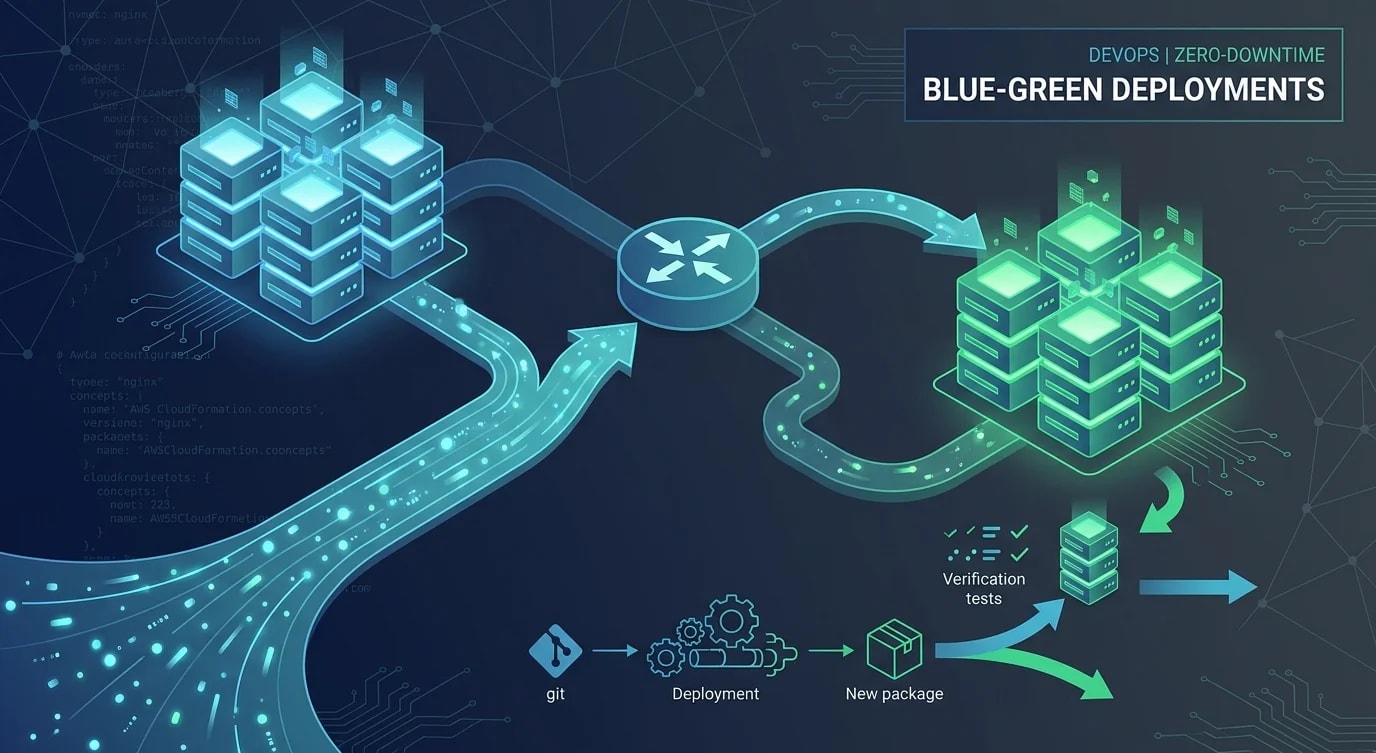
Los despliegues tradicionales tienen un momento aterrador: la versión antigua está caída, la nueva está arrancando, y tú estás esperando que nada se rompa. Los despliegues blue-green eliminan ese intervalo manteniendo dos entornos de producción idénticos. En cualquier momento, uno atiende el tráfico en vivo (blue) mientras el otro ejecuta la nueva versión (green). Cuando la nueva versión está verificada, cambias el tráfico. Si algo sale mal, vuelves a cambiarlo.
La arquitectura
La idea central es simple: un enrutador (balanceador de carga, DNS o proxy inverso) dirige todo el tráfico a un entorno. El otro entorno está inactivo, listo para aceptar el nuevo despliegue.
# ❌ Single environment — downtime during deployment
upstream api {
  server api-v1:3000;
  # During deployment: stop v1, start v2, hope for the best
}

# ✅ Blue-green with nginx — traffic switch via config reload
# blue is currently live
upstream api_blue {
  server api-blue-1:3000;
  server api-blue-2:3000;
  server api-blue-3:3000;
}

upstream api_green {
  server api-green-1:3000;
  server api-green-2:3000;
  server api-green-3:3000;
}

# Point to the active environment
upstream api_active {
  server api-blue-1:3000;
  server api-blue-2:3000;
  server api-blue-3:3000;
}

server {
  listen 80;
  location / {
    proxy_pass http://api_active;
  }
}
Implementación en AWS con ALB
En AWS, los Application Load Balancers ofrecen un mecanismo blue-green limpio mediante el cambio de grupos de destino (target groups).
import {
  ElasticLoadBalancingV2Client,
  ModifyListenerCommand,
  DescribeTargetHealthCommand,
} from "@aws-sdk/client-elastic-load-balancing-v2";

const elbClient = new ElasticLoadBalancingV2Client({});

async function switchTraffic(
  listenerArn: string,
  targetGroupArn: string
): Promise<void> {
  // Verify all targets in the new group are healthy
  const healthResponse = await elbClient.send(
    new DescribeTargetHealthCommand({ TargetGroupArn: targetGroupArn })
  );

  const unhealthy = healthResponse.TargetHealthDescriptions?.filter(
    (t) => t.TargetHealth?.State !== "healthy"
  );

  if (unhealthy && unhealthy.length > 0) {
    throw new Error(
      `Cannot switch: ${unhealthy.length} unhealthy targets in new group`
    );
  }

  // Switch the listener to the new target group
  await elbClient.send(
    new ModifyListenerCommand({
      ListenerArn: listenerArn,
      DefaultActions: [
        {
          Type: "forward",
          TargetGroupArn: targetGroupArn,
        },
      ],
    })
  );

  console.log(`Traffic switched to ${targetGroupArn}`);
}
Verificación previa al cambio
Cambiar el tráfico sin verificación anula todo el propósito. Ejecuta comprobaciones automatizadas contra el entorno green antes de exponerlo a los usuarios.
// ❌ Deploy and switch immediately
async function deploy() {
  await deployToGreen(newVersion);
  await switchTraffic(greenTargetGroup); // No verification!
}

// ✅ Deploy, verify, then switch
async function deploy() {
  await deployToGreen(newVersion);

  // Run smoke tests against the green environment directly
  const smokeTestResults = await runSmokeTests({
    baseUrl: "http://green-internal.example.com",
    tests: [
      { name: "health", method: "GET", path: "/health", expectedStatus: 200 },
      { name: "auth", method: "POST", path: "/api/auth/verify", expectedStatus: 200 },
      { name: "list-items", method: "GET", path: "/api/items?limit=1", expectedStatus: 200 },
    ],
    timeoutMs: 5000,
  });

  if (smokeTestResults.failures.length > 0) {
    console.error("Smoke tests failed:", smokeTestResults.failures);
    throw new Error("Aborting deployment: smoke tests failed on green environment");
  }

  // Verify response schema matches expectations
  const schemaValid = await validateResponseSchema({
    baseUrl: "http://green-internal.example.com",
    endpoints: ["/api/items", "/api/users/me"],
  });

  if (!schemaValid) {
    throw new Error("Aborting deployment: API schema validation failed");
  }

  await switchTraffic(greenTargetGroup);
  console.log("Deployment complete — traffic now on green");
}
Consideraciones sobre la base de datos
La parte más difícil de los despliegues blue-green es la base de datos. Ambos entornos deben funcionar con los mismos datos, lo que significa que los cambios en la base de datos deben ser retrocompatibles.
// ❌ Breaking migration — blue can't work with green's schema
// Migration: RENAME COLUMN users.name TO users.full_name
// Blue environment immediately breaks because it still queries "name"

// ✅ Two-phase migration — compatible with both versions
// Phase 1: Add new column (deploy with green)
// Migration: ALTER TABLE users ADD COLUMN full_name VARCHAR(255);
// Backfill: UPDATE users SET full_name = name WHERE full_name IS NULL;
// Green reads from full_name, Blue continues reading from name

// Phase 2: Remove old column (only after blue is decommissioned)
// Migration: ALTER TABLE users DROP COLUMN name;
// This runs only after confirming no environment reads "name"

interface MigrationPhase {
  step: number;
  migration: string;
  compatible_versions: string[];
  safe_to_rollback: boolean;
}

const migrationPlan: MigrationPhase[] = [
  {
    step: 1,
    migration: "ALTER TABLE users ADD COLUMN full_name VARCHAR(255)",
    compatible_versions: ["v1.2.0", "v1.3.0"],
    safe_to_rollback: true,
  },
  {
    step: 2,
    migration: "UPDATE users SET full_name = name WHERE full_name IS NULL",
    compatible_versions: ["v1.2.0", "v1.3.0"],
    safe_to_rollback: true,
  },
  {
    step: 3,
    migration: "ALTER TABLE users DROP COLUMN name",
    compatible_versions: ["v1.3.0"],  // Only after v1.2.0 is gone
    safe_to_rollback: false,
  },
];
Estrategia de rollback
La principal ventaja de blue-green es el rollback instantáneo. Si algo sale mal después del cambio, redirige el tráfico de vuelta al entorno anterior.
# Current state: green is live (v1.3.0), blue still has v1.2.0
# Problem detected in v1.3.0

# Instant rollback — switch back to blue
aws elbv2 modify-listener \
  --listener-arn "$LISTENER_ARN" \
  --default-actions "Type=forward,TargetGroupArn=$BLUE_TARGET_GROUP"

# Rollback complete in seconds — no redeployment needed
# Blue is still running v1.2.0 exactly as it was

# Investigate, fix, and redeploy to green when ready
Implicaciones de costo
Ejecutar dos entornos idénticos duplica tu costo de infraestructura, pero solo de forma temporal. Después de la verificación, puedes reducir el entorno inactivo a su capacidad mínima y volver a escalarlo antes del siguiente despliegue.
Puntos clave
- Blue-green elimina el tiempo de inactividad del despliegue — el tráfico cambia instantáneamente entre dos entornos idénticos
- Siempre verifica antes de cambiar — ejecuta smoke tests y validación de esquema contra el entorno green
- Las migraciones de base de datos deben ser retrocompatibles — ambos entornos comparten la misma base de datos durante la transición
- El rollback es instantáneo — redirige el tráfico de vuelta al entorno anterior sin redesplegar
- Usa migraciones en dos fases — añade las estructuras nuevas primero, elimina las antiguas solo cuando la versión vieja ya no exista
- Gestiona los costos reduciendo la escala de los entornos inactivos — no necesitas capacidad completa en ambos entornos al mismo tiempo