Automating Dev Environments with Dev Containers and Nix
End works-on-my-machine by pairing Dev Containers for IDE integration with Nix for reproducible dependencies — versioned, portable, identical setups.
The Onboarding Tax
Every new team member spends hours—sometimes days—installing the right Node version, the right database driver, the right system dependencies. README instructions drift out of date. Someone has Python 3.11 while the project needs 3.12. The CI server uses a different Postgres version than local development. These are solvable problems, and the solution is automated, reproducible developer environments.
Dev Containers for IDE Integration
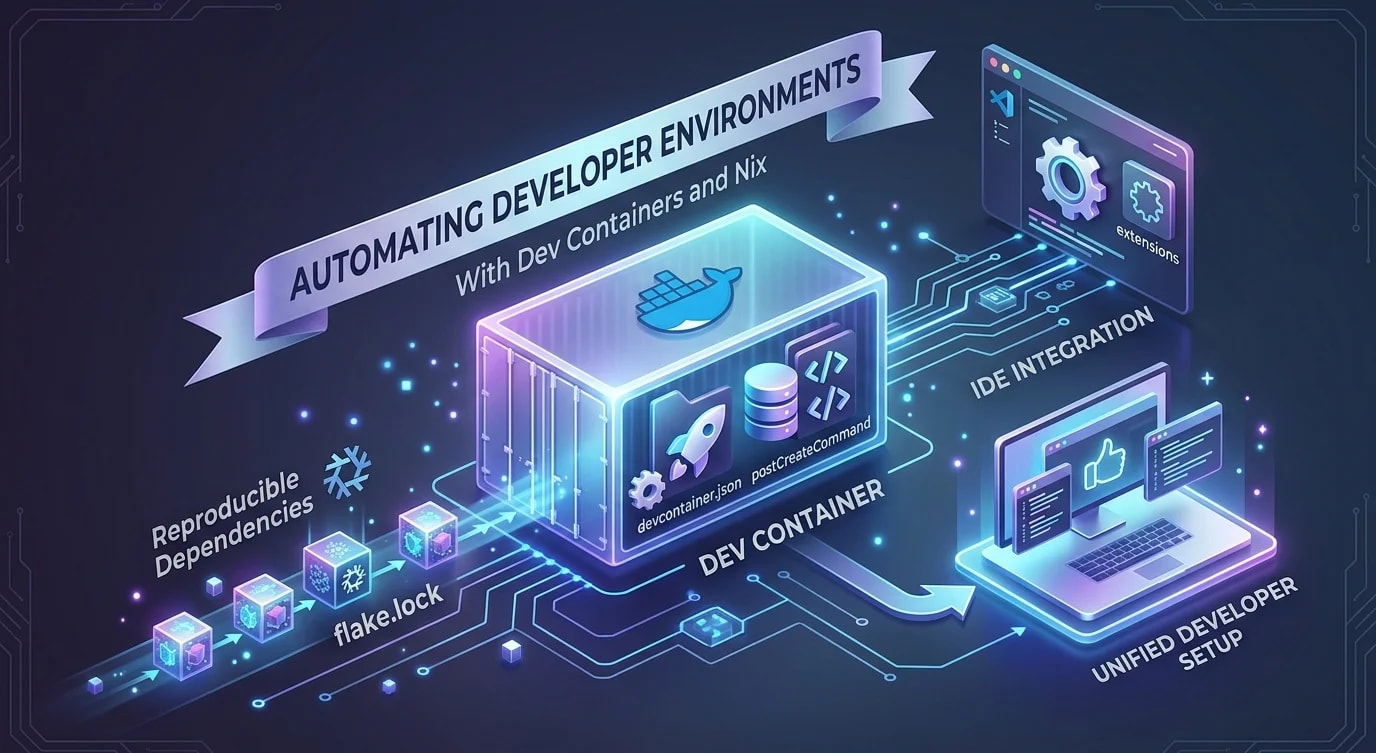
Dev Containers define a Docker environment that VS Code (or any compatible IDE) attaches to directly. The entire development environment—runtime, tools, extensions, settings—is version-controlled alongside the code.
// .devcontainer/devcontainer.json
{
  "name": "Project Dev Environment",
  "dockerComposeFile": "docker-compose.yml",
  "service": "app",
  "workspaceFolder": "/workspace",
  "features": {
    "ghcr.io/devcontainers/features/node:1": {
      "version": "20"
    },
    "ghcr.io/devcontainers/features/git:1": {}
  },
  "customizations": {
    "vscode": {
      "extensions": [
        "dbaeumer.vscode-eslint",
        "esbenp.prettier-vscode",
        "prisma.prisma"
      ],
      "settings": {
        "editor.formatOnSave": true,
        "editor.defaultFormatter": "esbenp.prettier-vscode"
      }
    }
  },
  "postCreateCommand": "npm ci",
  "forwardPorts": [3000, 5432, 6379]
}# .devcontainer/docker-compose.yml
services:
app:
build:
context: ..
dockerfile: .devcontainer/Dockerfile
volumes:
- ..:/workspace:cached
command: sleep infinity
postgres:
image: postgres:16
environment:
POSTGRES_DB: app_dev
POSTGRES_USER: dev
POSTGRES_PASSWORD: dev
volumes:
- pgdata:/var/lib/postgresql/data
ports:
- "5432:5432"
redis:
image: redis:7-alpine
ports:
- "6379:6379"
volumes:
pgdata:Nix for Reproducible Dependencies
Docker gives you OS-level isolation. Nix gives you package-level reproducibility. Every dependency is pinned to an exact version through a content-addressed store, meaning two developers with the same flake.lock file have byte-identical toolchains.
# flake.nix
{
  description = "Project development environment";

  inputs = {
    nixpkgs.url = "github:NixOS/nixpkgs/nixos-24.05";
    flake-utils.url = "github:numtide/flake-utils";
  };

  outputs = { self, nixpkgs, flake-utils }:
    flake-utils.lib.eachDefaultSystem (system:
      let
        pkgs = nixpkgs.legacyPackages.${system};
      in {
        devShells.default = pkgs.mkShell {
          buildInputs = with pkgs; [
            nodejs_20
            nodePackages.pnpm
            postgresql_16
            redis
            openssl
            pkg-config
          ];

          shellHook = ''
            echo "Dev environment loaded"
            echo "Node: $(node --version)"
            echo "pnpm: $(pnpm --version)"
            export DATABASE_URL="postgresql://dev:dev@localhost:5432/app_dev"
          '';
        };
      }
    );
}// ❌ README-based setup — drifts constantly
// "Install Node 20, install pnpm, install Postgres 16,
// set these env vars, run these 12 commands..."
// ✅ One command — identical environment every time
// nix develop
// or
// devcontainer up --workspace-folder .
interface EnvironmentSpec {
runtime: { name: string; version: string };
tools: Array<{ name: string; version: string }>;
services: Array<{ name: string; version: string; port: number }>;
envVars: Record<string, string>;
}
function verifyEnvironment(spec: EnvironmentSpec): {
valid: boolean;
mismatches: string[];
} {
const mismatches: string[] = [];
// Check runtime version
const nodeVersion = process.version;
if (!nodeVersion.startsWith(`v${spec.runtime.version}`)) {
mismatches.push(
`Node version mismatch: expected ${spec.runtime.version}, got ${nodeVersion}`
);
}
// Check required env vars
for (const [key, expected] of Object.entries(spec.envVars)) {
if (!process.env[key]) {
mismatches.push(`Missing environment variable: ${key}`);
}
}
return { valid: mismatches.length === 0, mismatches };
}Combining Dev Containers and Nix
The most robust approach uses both: Dev Containers for the IDE experience and service orchestration, Nix inside the container for precise tool versions. This gives you Docker's isolation with Nix's reproducibility.
# .devcontainer/Dockerfile
FROM nixos/nix:latest AS dev

# Enable flakes
RUN echo "experimental-features = nix-command flakes" >> /etc/nix/nix.conf

WORKDIR /workspace

# Copy just the Nix files first for caching
COPY flake.nix flake.lock ./
RUN nix develop --command echo "Dependencies cached"

# The dev shell is now pre-built in the image
ENTRYPOINT ["nix", "develop", "--command"]
CMD ["bash"]// scripts/check-env.ts
// Run as postCreateCommand to verify environment
async function checkEnvironment(): Promise<void> {
const checks = [
{ name: "Node.js", command: "node --version", expected: /^v20/ },
{ name: "pnpm", command: "pnpm --version", expected: /^9/ },
{ name: "PostgreSQL", command: "psql --version", expected: /16/ },
];
const results = await Promise.all(
checks.map(async (check) => {
try {
const { stdout } = await exec(check.command);
const matches = check.expected.test(stdout.trim());
return { ...check, stdout: stdout.trim(), pass: matches };
} catch {
return { ...check, stdout: "not found", pass: false };
}
})
);
const failures = results.filter((r) => !r.pass);
if (failures.length > 0) {
console.error("Environment check failed:");
for (const f of failures) {
console.error(` ${f.name}: expected ${f.expected}, got "${f.stdout}"`);
}
process.exit(1);
}
console.log("All environment checks passed");
for (const r of results) {
console.log(` ${r.name}: ${r.stdout}`);
}
}Managing Secrets in Dev Environments
Dev environments need credentials for databases, APIs, and services. These must never be committed to version control, even for development.
// .devcontainer/init-secrets.sh generates a .env from a template
// .env.template is committed; .env is gitignored

interface SecretConfig {
  name: string;
  source: "vault" | "env" | "generated";
  generateFn?: () => string;
}

const devSecrets: SecretConfig[] = [
  {
    name: "DATABASE_URL",
    source: "generated",
    generateFn: () =>
      "postgresql://dev:dev@postgres:5432/app_dev",
  },
  {
    name: "REDIS_URL",
    source: "generated",
    generateFn: () => "redis://redis:6379",
  },
  {
    name: "JWT_SECRET",
    source: "generated",
    generateFn: () => {
      const bytes = new Uint8Array(32);
      crypto.getRandomValues(bytes);
      return Buffer.from(bytes).toString("base64");
    },
  },
  {
    name: "EXTERNAL_API_KEY",
    source: "vault", // Fetched from secrets manager
  },
];

function generateEnvFile(secrets: SecretConfig[]): string {
  return secrets
    .map((s) => {
      if (s.source === "generated" && s.generateFn) {
        return `${s.name}=${s.generateFn()}`;
      }
      return `${s.name}=# Set manually or fetch from vault`;
    })
    .join("\n");
}
Key Takeaways
Automated developer environments eliminate onboarding friction and "works on my machine" bugs. Dev Containers provide IDE integration, service orchestration, and extension management—all version-controlled. Nix provides byte-level reproducibility for every tool and dependency, ensuring two developers never have different compiler versions.
Combine both for the strongest setup: Docker for service isolation, Nix inside the container for tool precision. Run an environment verification script as a post-create command to catch configuration drift immediately. Keep secrets out of version control with generated .env files and vault integration.
The investment is a few configuration files committed alongside the code. The return is that every developer, from day one, has a working environment identical to CI and to every other team member—no setup docs, no version mismatches, no wasted days.