Optimistic UI Updates: Instant Interfaces with Rollback
Implement optimistic UI updates that feel instant by showing expected state immediately, reconciling with the server and rolling back when a mutation fails.
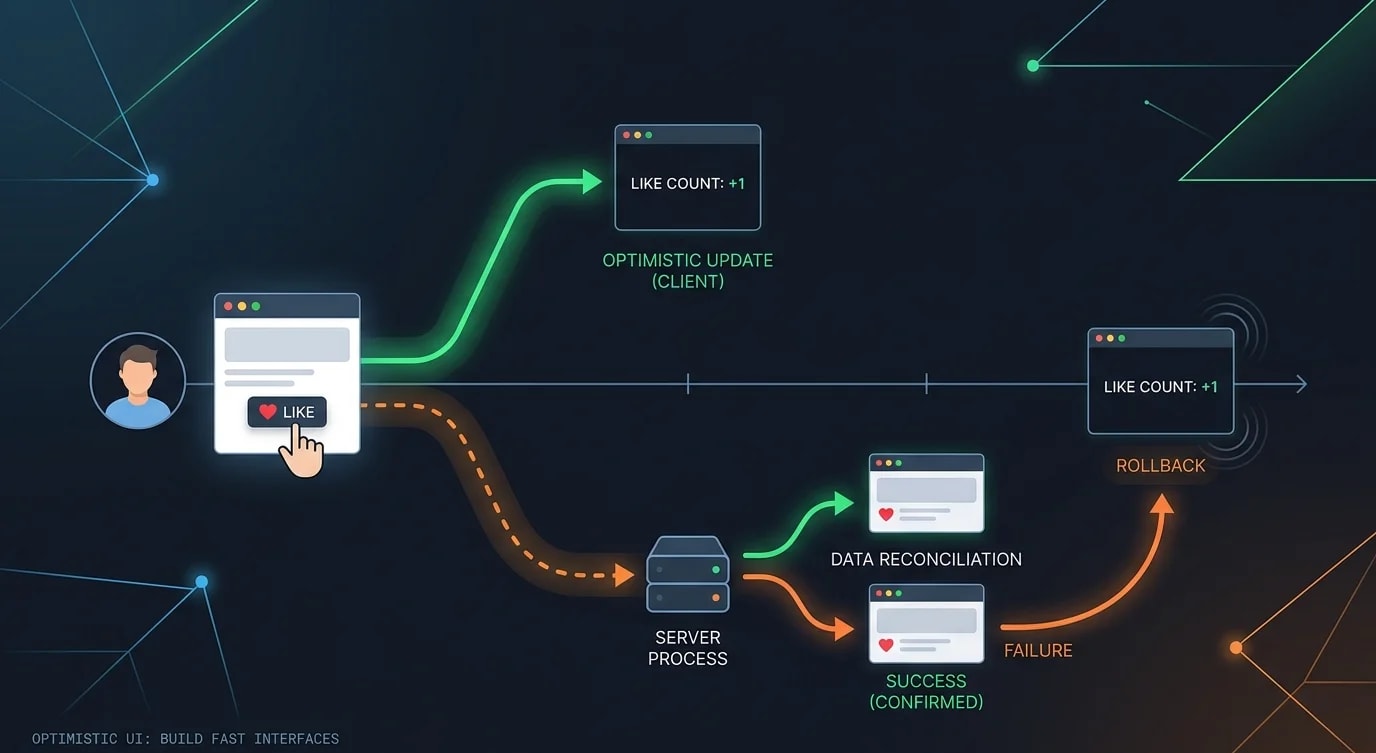
Why Optimistic Updates
Every network request introduces latency. When a user clicks "like," waiting 200ms for the server to respond before updating the UI feels sluggish. Optimistic updates apply the expected result immediately, making the interface feel instant. If the server rejects the mutation, the UI rolls back to the previous state.
The Basic Pattern
The core flow: save current state, apply optimistic change, send mutation, confirm or rollback.
// ❌ Pessimistic — user waits for server round trip
async function handleLike(postId: string): Promise<void> {
  setLoading(true);
  const result = await fetch(`/api/posts/${postId}/like`, { method: "POST" });
  if (result.ok) {
    setLiked(true);
    setLikeCount((c) => c + 1);
  }
  setLoading(false);
}

// ✅ Optimistic — instant feedback with rollback
async function handleLike(postId: string): Promise<void> {
  // 1. Save previous state for rollback
  const previousLiked = liked;
  const previousCount = likeCount;

  // 2. Apply optimistic update immediately
  setLiked(true);
  setLikeCount((c) => c + 1);

  try {
    // 3. Send mutation to server
    const result = await fetch(`/api/posts/${postId}/like`, {
      method: "POST",
    });

    if (!result.ok) throw new Error("Like failed");

    // 4. Optionally reconcile with server data
    const data = await result.json();
    setLikeCount(data.likeCount); // Use server's canonical count
  } catch {
    // 5. Rollback on failure
    setLiked(previousLiked);
    setLikeCount(previousCount);
    toast.error("Failed to like post. Please try again.");
  }
}
Generic Optimistic Hook
Extract the pattern into a reusable hook that handles any optimistic mutation with automatic rollback.
import { useState, useCallback, useRef } from "react";

interface OptimisticOptions<T> {
  onError?: (error: Error, previousState: T) => void;
  onSuccess?: (result: unknown, currentState: T) => void;
}

function useOptimistic<T>(
  initialState: T,
  options?: OptimisticOptions<T>
): {
  state: T;
  isPending: boolean;
  update: (optimisticState: T, mutation: () => Promise<unknown>) => void;
} {
  const [state, setState] = useState(initialState);
  const [isPending, setIsPending] = useState(false);
  const rollbackRef = useRef<T>(initialState);

  const update = useCallback(
    async (optimisticState: T, mutation: () => Promise<unknown>) => {
      // Store rollback point
      rollbackRef.current = state;
      setState(optimisticState);
      setIsPending(true);

      try {
        const result = await mutation();
        options?.onSuccess?.(result, optimisticState);
      } catch (error) {
        // Rollback to previous state
        setState(rollbackRef.current);
        options?.onError?.(error as Error, rollbackRef.current);
      } finally {
        setIsPending(false);
      }
    },
    [state, options]
  );

  return { state, isPending, update };
}
Optimistic Lists: Adding and Removing Items
List operations—adding, removing, reordering—benefit most from optimistic updates because the latency is most noticeable.
interface Todo {
  id: string;
  text: string;
  completed: boolean;
}

function TodoList() {
  const [todos, setTodos] = useState<Todo[]>([]);

  async function addTodo(text: string): Promise<void> {
    // Generate a temporary ID for the optimistic item
    const tempId = `temp-${crypto.randomUUID()}`;
    const optimisticTodo: Todo = {
      id: tempId,
      text,
      completed: false,
    };

    // Add immediately
    setTodos((prev) => [...prev, optimisticTodo]);

    try {
      const response = await fetch("/api/todos", {
        method: "POST",
        headers: { "Content-Type": "application/json" },
        body: JSON.stringify({ text }),
      });
      const created = await response.json();

      // Replace temp item with server-created item (gets real ID)
      setTodos((prev) =>
        prev.map((t) => (t.id === tempId ? created : t))
      );
    } catch {
      // Remove the optimistic item
      setTodos((prev) => prev.filter((t) => t.id !== tempId));
      toast.error("Failed to add todo");
    }
  }

  async function removeTodo(id: string): Promise<void> {
    const previousTodos = [...todos];

    // Remove immediately
    setTodos((prev) => prev.filter((t) => t.id !== id));

    try {
      await fetch(`/api/todos/${id}`, { method: "DELETE" });
    } catch {
      // Restore the item
      setTodos(previousTodos);
      toast.error("Failed to remove todo");
    }
  }

  return (
    <ul>
      {todos.map((todo) => (
        <li
          key={todo.id}
          style={{
            opacity: todo.id.startsWith("temp-") ? 0.6 : 1,
          }}
        >
          {todo.text}
          <button onClick={() => removeTodo(todo.id)}>×</button>
        </li>
      ))}
    </ul>
  );
}
React 19 useOptimistic
React 19 includes a built-in useOptimistic hook that simplifies the pattern, especially with Server Actions.
"use client";
import { useOptimistic, useTransition } from "react";
import { toggleLike } from "@/actions/likes";

interface Post {
  id: string;
  title: string;
  liked: boolean;
  likeCount: number;
}

function PostCard({ post }: { post: Post }) {
  const [isPending, startTransition] = useTransition();
  const [optimisticPost, setOptimisticPost] = useOptimistic(
    post,
    (currentPost: Post, newLiked: boolean) => ({
      ...currentPost,
      liked: newLiked,
      likeCount: currentPost.likeCount + (newLiked ? 1 : -1),
    })
  );

  function handleToggleLike() {
    startTransition(async () => {
      setOptimisticPost(!optimisticPost.liked);
      await toggleLike(post.id);
    });
  }

  return (
    <article>
      <h2>{optimisticPost.title}</h2>
      <button onClick={handleToggleLike} disabled={isPending}>
        {optimisticPost.liked ? "❤️" : "🤍"} {optimisticPost.likeCount}
      </button>
    </article>
  );
}
Handling Concurrent Optimistic Updates
When users trigger multiple mutations rapidly—toggling likes, reordering items—you need to handle concurrent optimistic states without corruption.
class OptimisticQueue<T> {
  private pendingUpdates: Map<string, {
    previous: T;
    optimistic: T;
    mutation: Promise<unknown>;
  }> = new Map();

  async enqueue(
    key: string,
    currentState: T,
    optimisticState: T,
    mutation: () => Promise<T>,
    onStateChange: (state: T) => void
  ): Promise<void> {
    // Cancel conflicting pending update for same key
    if (this.pendingUpdates.has(key)) {
      // Use the ORIGINAL previous state, not the optimistic one
      const existing = this.pendingUpdates.get(key)!;
      this.pendingUpdates.delete(key);
      currentState = existing.previous;
    }

    onStateChange(optimisticState);

    const mutationPromise = mutation();
    this.pendingUpdates.set(key, {
      previous: currentState,
      optimistic: optimisticState,
      mutation: mutationPromise,
    });

    try {
      const serverState = await mutationPromise;
      if (this.pendingUpdates.has(key)) {
        onStateChange(serverState);
        this.pendingUpdates.delete(key);
      }
    } catch {
      if (this.pendingUpdates.has(key)) {
        onStateChange(this.pendingUpdates.get(key)!.previous);
        this.pendingUpdates.delete(key);
      }
    }
  }
}
Visual Feedback During Pending State
Users should know when data is optimistic versus confirmed. Subtle visual cues maintain trust without blocking interaction.
function CommentItem({
  comment,
  isPending,
}: {
  comment: Comment;
  isPending: boolean;
}) {
  return (
    <div
      className={`comment ${isPending ? "comment--pending" : ""}`}
      aria-busy={isPending}
    >
      <p>{comment.text}</p>
      <span className="comment__author">{comment.authorName}</span>
      {isPending && (
        <span className="comment__status" aria-label="Saving comment">
          Saving...
        </span>
      )}
    </div>
  );
}.comment--pending {
opacity: 0.7;
pointer-events: none;
position: relative;
}
.comment--pending::after {
content: "";
position: absolute;
inset: 0;
background: repeating-linear-gradient(
-45deg,
transparent,
transparent 4px,
rgba(0, 0, 0, 0.03) 4px,
rgba(0, 0, 0, 0.03) 8px
);
}Key Takeaways
Optimistic updates make interfaces feel instant by applying expected state immediately and reconciling with the server afterward. Always save the previous state before applying optimistic changes so you can roll back on failure. Use temporary IDs for newly created items, then replace them with server-generated IDs on success.
Handle concurrent mutations carefully—when users act faster than the network, maintain the correct rollback state. Show subtle visual feedback (reduced opacity, "saving..." indicators) so users know data is pending without blocking their interaction. React 19's useOptimistic hook simplifies the pattern for Server Actions. The key insight: users perceive your app as fast when the UI responds to their actions immediately, even if the server takes 200ms to confirm.


