Optimistische UI-Updates: Sofortige Oberflächen mit Rollback
Optimistische UI-Updates, die sofort wirken: erwarteten Zustand anzeigen, mit der Serverantwort abgleichen und bei Fehlern sauber zurücksetzen.
Warum optimistische Updates
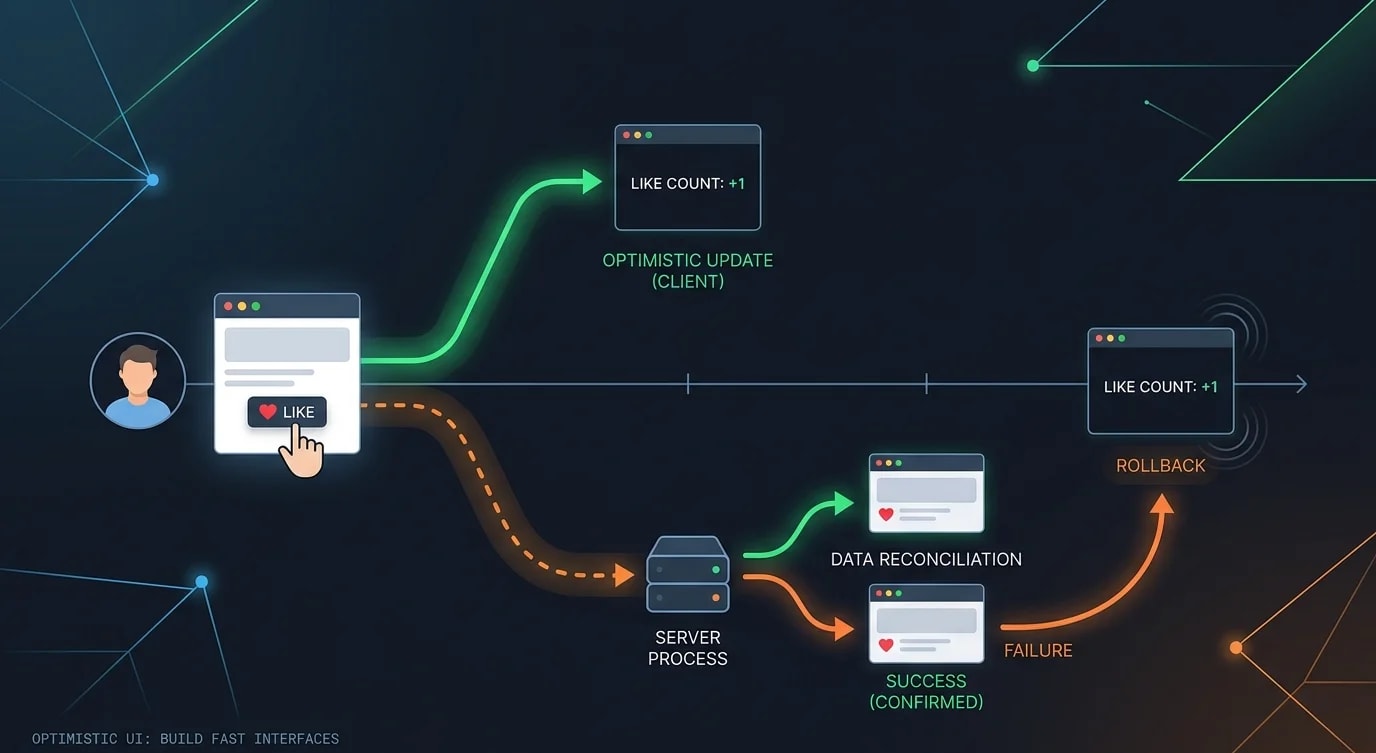
Jede Netzwerkanfrage bringt Latenz mit sich. Wenn ein Nutzer auf „Gefällt mir" klickt, fühlt sich das Warten von 200 ms auf die Serverantwort träge an, bevor die Oberfläche aktualisiert wird. Optimistische Updates wenden das erwartete Ergebnis sofort an, wodurch sich die Oberfläche augenblicklich anfühlt. Lehnt der Server die Mutation ab, springt die Oberfläche zurück in den vorherigen Zustand.
Das Grundmuster
Der Kernablauf: aktuellen Zustand speichern, optimistische Änderung anwenden, Mutation senden, bestätigen oder zurückrollen.
// ❌ Pessimistic — user waits for server round trip
async function handleLike(postId: string): Promise<void> {
  setLoading(true);
  const result = await fetch(`/api/posts/${postId}/like`, { method: "POST" });
  if (result.ok) {
    setLiked(true);
    setLikeCount((c) => c + 1);
  }
  setLoading(false);
}

// ✅ Optimistic — instant feedback with rollback
async function handleLike(postId: string): Promise<void> {
  // 1. Save previous state for rollback
  const previousLiked = liked;
  const previousCount = likeCount;

  // 2. Apply optimistic update immediately
  setLiked(true);
  setLikeCount((c) => c + 1);

  try {
    // 3. Send mutation to server
    const result = await fetch(`/api/posts/${postId}/like`, {
      method: "POST",
    });

    if (!result.ok) throw new Error("Like failed");

    // 4. Optionally reconcile with server data
    const data = await result.json();
    setLikeCount(data.likeCount); // Use server's canonical count
  } catch {
    // 5. Rollback on failure
    setLiked(previousLiked);
    setLikeCount(previousCount);
    toast.error("Failed to like post. Please try again.");
  }
}
Ein generischer Optimistic-Hook
Extrahiere das Muster in einen wiederverwendbaren Hook, der jede optimistische Mutation mit automatischem Rollback handhabt.
import { useState, useCallback, useRef } from "react";

interface OptimisticOptions<T> {
  onError?: (error: Error, previousState: T) => void;
  onSuccess?: (result: unknown, currentState: T) => void;
}

function useOptimistic<T>(
  initialState: T,
  options?: OptimisticOptions<T>
): {
  state: T;
  isPending: boolean;
  update: (optimisticState: T, mutation: () => Promise<unknown>) => void;
} {
  const [state, setState] = useState(initialState);
  const [isPending, setIsPending] = useState(false);
  const rollbackRef = useRef<T>(initialState);

  const update = useCallback(
    async (optimisticState: T, mutation: () => Promise<unknown>) => {
      // Store rollback point
      rollbackRef.current = state;
      setState(optimisticState);
      setIsPending(true);

      try {
        const result = await mutation();
        options?.onSuccess?.(result, optimisticState);
      } catch (error) {
        // Rollback to previous state
        setState(rollbackRef.current);
        options?.onError?.(error as Error, rollbackRef.current);
      } finally {
        setIsPending(false);
      }
    },
    [state, options]
  );

  return { state, isPending, update };
}
Optimistische Listen: Elemente hinzufügen und entfernen
Listenoperationen — Hinzufügen, Entfernen, Neuordnen — profitieren am meisten von optimistischen Updates, weil die Latenz dort am deutlichsten auffällt.
interface Todo {
  id: string;
  text: string;
  completed: boolean;
}

function TodoList() {
  const [todos, setTodos] = useState<Todo[]>([]);

  async function addTodo(text: string): Promise<void> {
    // Generate a temporary ID for the optimistic item
    const tempId = `temp-${crypto.randomUUID()}`;
    const optimisticTodo: Todo = {
      id: tempId,
      text,
      completed: false,
    };

    // Add immediately
    setTodos((prev) => [...prev, optimisticTodo]);

    try {
      const response = await fetch("/api/todos", {
        method: "POST",
        headers: { "Content-Type": "application/json" },
        body: JSON.stringify({ text }),
      });
      const created = await response.json();

      // Replace temp item with server-created item (gets real ID)
      setTodos((prev) =>
        prev.map((t) => (t.id === tempId ? created : t))
      );
    } catch {
      // Remove the optimistic item
      setTodos((prev) => prev.filter((t) => t.id !== tempId));
      toast.error("Failed to add todo");
    }
  }

  async function removeTodo(id: string): Promise<void> {
    const previousTodos = [...todos];

    // Remove immediately
    setTodos((prev) => prev.filter((t) => t.id !== id));

    try {
      await fetch(`/api/todos/${id}`, { method: "DELETE" });
    } catch {
      // Restore the item
      setTodos(previousTodos);
      toast.error("Failed to remove todo");
    }
  }

  return (
    <ul>
      {todos.map((todo) => (
        <li
          key={todo.id}
          style={{
            opacity: todo.id.startsWith("temp-") ? 0.6 : 1,
          }}
        >
          {todo.text}
          <button onClick={() => removeTodo(todo.id)}>×</button>
        </li>
      ))}
    </ul>
  );
}
useOptimistic in React 19
React 19 bringt einen eingebauten useOptimistic-Hook mit, der das Muster vereinfacht, besonders im Zusammenspiel mit Server Actions.
"use client";
import { useOptimistic, useTransition } from "react";
import { toggleLike } from "@/actions/likes";

interface Post {
  id: string;
  title: string;
  liked: boolean;
  likeCount: number;
}

function PostCard({ post }: { post: Post }) {
  const [isPending, startTransition] = useTransition();
  const [optimisticPost, setOptimisticPost] = useOptimistic(
    post,
    (currentPost: Post, newLiked: boolean) => ({
      ...currentPost,
      liked: newLiked,
      likeCount: currentPost.likeCount + (newLiked ? 1 : -1),
    })
  );

  function handleToggleLike() {
    startTransition(async () => {
      setOptimisticPost(!optimisticPost.liked);
      await toggleLike(post.id);
    });
  }

  return (
    <article>
      <h2>{optimisticPost.title}</h2>
      <button onClick={handleToggleLike} disabled={isPending}>
        {optimisticPost.liked ? "❤️" : "🤍"} {optimisticPost.likeCount}
      </button>
    </article>
  );
}
Gleichzeitige optimistische Updates handhaben
Wenn Nutzer rasch mehrere Mutationen auslösen — etwa durch schnelles Liken oder Neuordnen von Elementen —, musst du gleichzeitige optimistische Zustände handhaben, ohne dass sie sich gegenseitig verfälschen.
class OptimisticQueue<T> {
  private pendingUpdates: Map<string, {
    previous: T;
    optimistic: T;
    mutation: Promise<unknown>;
  }> = new Map();

  async enqueue(
    key: string,
    currentState: T,
    optimisticState: T,
    mutation: () => Promise<T>,
    onStateChange: (state: T) => void
  ): Promise<void> {
    // Cancel conflicting pending update for same key
    if (this.pendingUpdates.has(key)) {
      // Use the ORIGINAL previous state, not the optimistic one
      const existing = this.pendingUpdates.get(key)!;
      this.pendingUpdates.delete(key);
      currentState = existing.previous;
    }

    onStateChange(optimisticState);

    const mutationPromise = mutation();
    this.pendingUpdates.set(key, {
      previous: currentState,
      optimistic: optimisticState,
      mutation: mutationPromise,
    });

    try {
      const serverState = await mutationPromise;
      if (this.pendingUpdates.has(key)) {
        onStateChange(serverState);
        this.pendingUpdates.delete(key);
      }
    } catch {
      if (this.pendingUpdates.has(key)) {
        onStateChange(this.pendingUpdates.get(key)!.previous);
        this.pendingUpdates.delete(key);
      }
    }
  }
}
Visuelles Feedback im ausstehenden Zustand
Nutzer sollten erkennen können, ob angezeigte Daten optimistisch oder bereits bestätigt sind. Dezente visuelle Hinweise erhalten das Vertrauen, ohne die Interaktion zu blockieren.
function CommentItem({
  comment,
  isPending,
}: {
  comment: Comment;
  isPending: boolean;
}) {
  return (
    <div
      className={`comment ${isPending ? "comment--pending" : ""}`}
      aria-busy={isPending}
    >
      <p>{comment.text}</p>
      <span className="comment__author">{comment.authorName}</span>
      {isPending && (
        <span className="comment__status" aria-label="Saving comment">
          Saving...
        </span>
      )}
    </div>
  );
}.comment--pending {
opacity: 0.7;
pointer-events: none;
position: relative;
}
.comment--pending::after {
content: "";
position: absolute;
inset: 0;
background: repeating-linear-gradient(
-45deg,
transparent,
transparent 4px,
rgba(0, 0, 0, 0.03) 4px,
rgba(0, 0, 0, 0.03) 8px
);
}Die wichtigsten Erkenntnisse
Optimistische Updates lassen Oberflächen augenblicklich reagieren, indem der erwartete Zustand sofort angewendet und anschließend mit dem Server abgeglichen wird. Speichere immer den vorherigen Zustand, bevor du eine optimistische Änderung anwendest, damit du bei einem Fehler zurückrollen kannst. Verwende temporäre IDs für neu erstellte Elemente und ersetze sie bei Erfolg durch die vom Server generierten IDs.
Behandle gleichzeitige Mutationen mit Sorgfalt — wenn Nutzer schneller handeln, als das Netzwerk reagieren kann, muss der korrekte Rollback-Zustand erhalten bleiben. Zeige dezentes visuelles Feedback (reduzierte Deckkraft, Hinweise wie „Wird gespeichert ...") an, damit Nutzer wissen, dass Daten noch ausstehen, ohne dass ihre Interaktion blockiert wird. Der useOptimistic-Hook von React 19 vereinfacht dieses Muster für Server Actions. Die zentrale Erkenntnis: Nutzer empfinden deine Anwendung als schnell, wenn die Oberfläche sofort auf ihre Aktionen reagiert — selbst wenn der Server 200 ms für die Bestätigung braucht.


